
Search Engine Optimization (SEO) Starter Guide

Google's SEO Starter Guide: What Website Teams Need to Know
- What Google's SEO Starter Guide covers
- SEO starts with users, not algorithms
- Technical SEO fundamentals every website team should know
- Content quality and search intent
- Linking best practices for a search-friendly website
- SEO for website redesigns and CMS migrations
- When to bring in SEO expertise
- How ImageX builds search-friendly digital experiences
Google's SEO starter guide is still one of the clearest explanations of how search engines find, read, and rank the pages you publish, written by the people who run the largest search engine on the planet.
It organizes everything around two questions: can a search engine find and understand your content, and once it can, will the page give a searcher a reason to choose it? Google refreshed it in 2024 to focus on those fundamentals and cut dated material.
Search engine optimization (SEO) today covers far more ground than it did a decade ago. Mobile experience, page speed, accessibility, structured content, and whether a page genuinely answers the question someone typed all factor into how you perform.
This article walks through what Google's fundamentals mean in practice for teams maintaining a website, planning a redesign, or rebuilding from the ground up. Think of it less as a summary and more as a translation, turning the basics into decisions you can act on.
SEO starts with users, not algorithms
Google's ranking systems are built to approximate what a useful result looks like to a person. Working toward that same goal, a better experience for your visitors, is the most dependable way to improve your rankings.
Tactics that try to manipulate rankings (stuffing pages with repeated keywords, hiding text the same colour as the background, buying links, or showing search engines different content than people see) are what Google's spam policies target, and sites that rely on them risk losing rankings or being removed from results entirely. The methods that hold up are the ones that improve the page for the people reading it.
Three areas carry most of that work: how your site is structured, how useful your content is, and how accessible your pages are.
Clear information architecture and navigation
Information architecture is how your content is organized and labelled. A clear structure helps visitors find what they need, and it helps Google understand how your pages relate to one another.
Group related content into logical sections, label navigation with the terms your audience uses, and keep important pages within a few clicks of the homepage. Pages buried deep in the structure are harder for visitors and crawlers to reach, and they tend to rank accordingly.
Helpful, original content only your team can write
Google rewards content that demonstrates first-hand knowledge. The pages that perform draw on information your organization holds directly: your data, your staff's expertise, and the outcomes you can document.
This is where you hold an advantage over generic content. For example, a university can explain its admissions process from direct experience. Content like this is difficult for competitors to reproduce, and it lines up with how Google evaluates experience and expertise.
Accessible, readable, and mobile-friendly page layouts
Accessibility and SEO success often come from the same effort, because they depend on page structure. Semantic HTML, a logical heading order, and descriptive alt text help screen readers and search engines interpret a page through the same signals.
Two more factors affect every visitor: layouts that stay readable on small screens, and pages that respond quickly on a phone. Google evaluates the mobile version of your site first, so that experience carries significant weight in your rankings.
Technical SEO fundamentals every website team should know
Technical SEO is where a lot of website SEO best practices live. It covers the parts of your website that determine whether search engines can access and interpret your content. You don't need to implement these yourself, but understanding them helps you direct your developers and your content management system (CMS), and recognize problems when they surface.
Crawlability and indexability
Before a page can rank, it has to be eligible for indexing. A search engine needs to reach the page, the page should return a successful status code, and it has to contain content the engine can read. These requirements come from Google Search Essentials, Google's baseline rules for appearing in search.
Several common problems keep a page out of the index, and none of them announce themselves:
- A noindex tag left on the page after launch, which tells Google to skip it entirely.
- A stray Disallow line in your robots.txt file (the small text file that tells crawlers where they can go), which blocks a whole directory at once.
- A 404 or 500 error returned when the page is requested.
- A canonical tag pointing at the wrong address.
- Content that loads only through JavaScript the crawler never runs.
The URL Inspection tool in Google Search Console shows how Google sees a given page, which makes it the first place to check when a page won't appear.
Page titles, meta descriptions, and heading structure
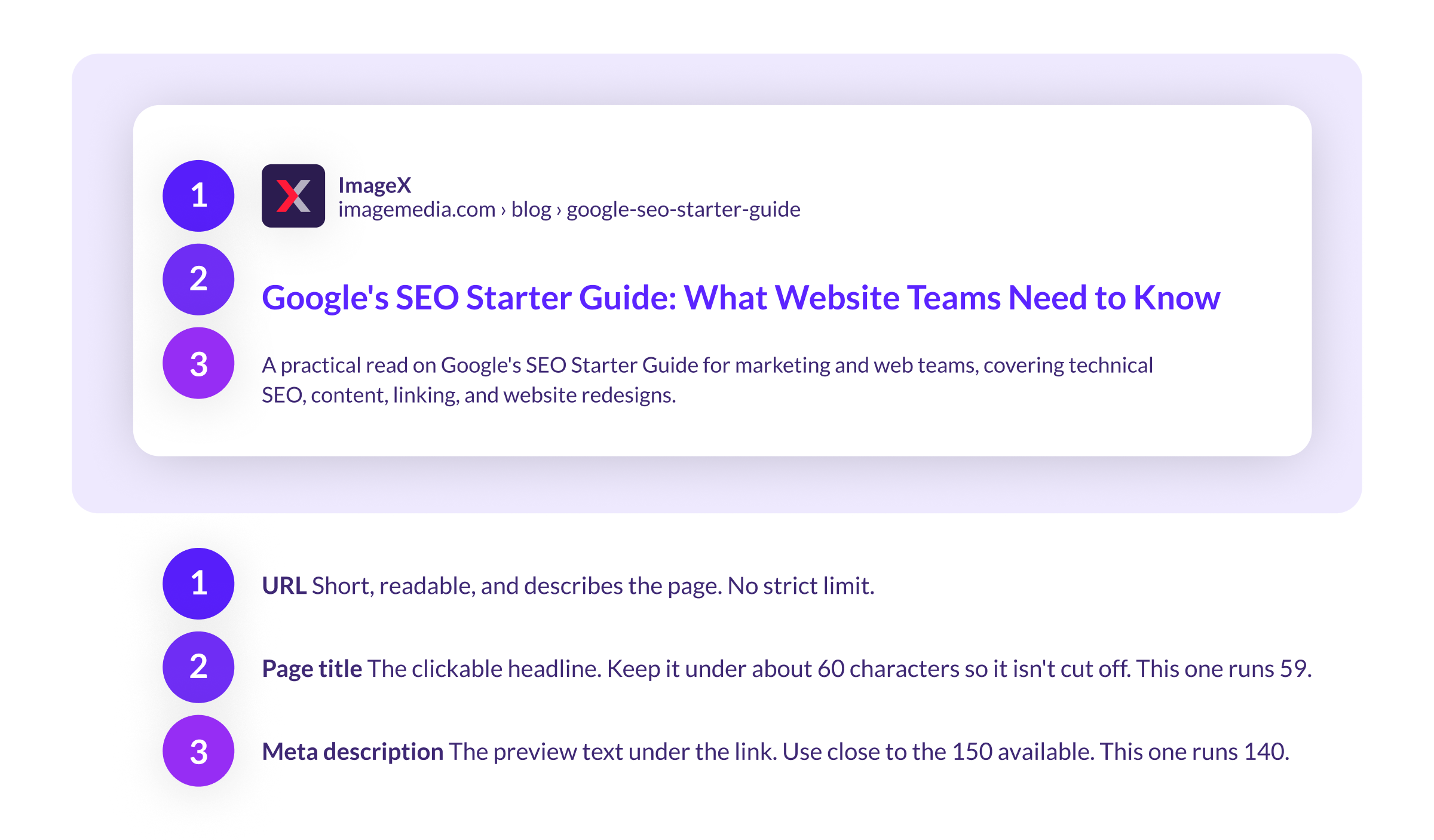
Titles and meta descriptions appear in search results, often before someone reaches your site, so they affect whether a result gets clicked. Write a title that states the page's topic and stays under about 60 characters so it isn't cut off. For the meta description, tell the searcher what they'll get from the page, and use close to the full 150 characters available.
Headings (H1, H2, H3) describe how a page is organized. Use them to reflect the structure of your content so the levels run in order and form a readable outline. Skipping a level to make text larger or smaller weakens that structure for screen readers and search engines.
Drupal teams can check titles, descriptions, and heading use with real-time SEO feedback while editing, before a page publishes.
The three parts of a search result you control, and the length each one should hit.
URL structure and internal links
A URL that describes its page, like /services/web-design, is easier for people to read and gives search engines another signal about the page's topic. Keep URLs short, use words in place of ID numbers, and avoid changing them without a redirect in place.
Internal links connect your pages to each other. They help visitors move through related content and help Google discover and rank pages.
Image optimization, alt text, and structured data
Three practices cover most image and markup work:
- Compress images so they load quickly, especially over mobile connections.
- Write alt text that describes each image, which supports screen readers and helps the image appear in image search.
- Add structured data, a standardized code format, to help Google display specific content types like events, articles, or job postings.
Each task is small on its own, and together they make a content-heavy site easier for Google to read.
Site speed, Core Web Vitals, and mobile usability
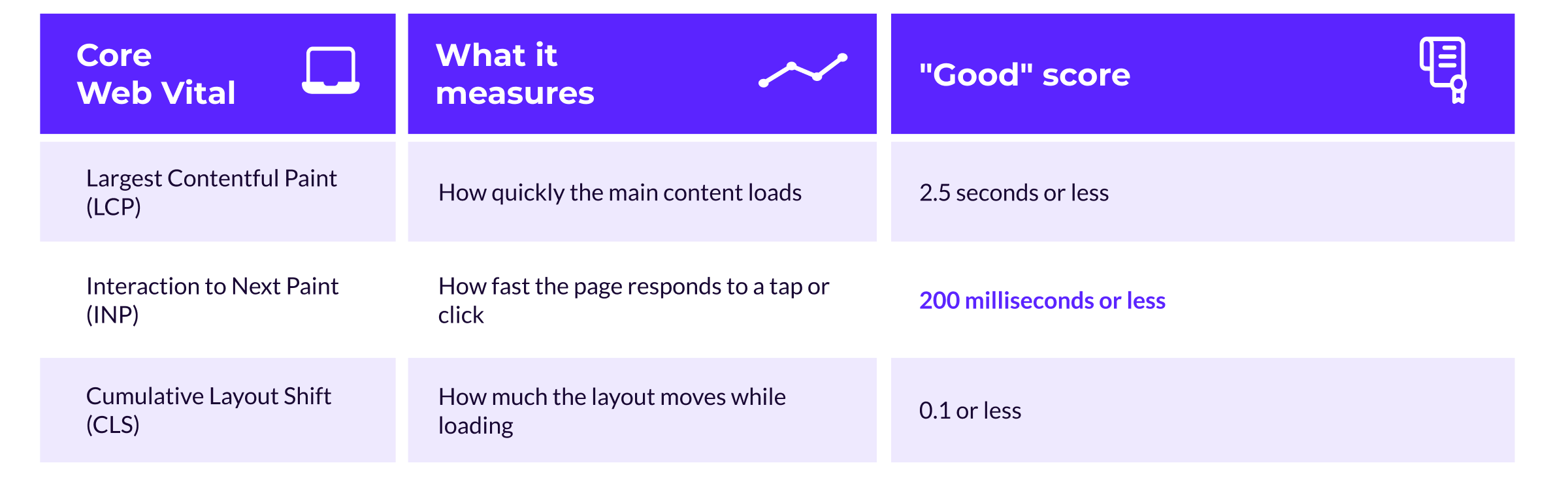
Google measures page experience with three Core Web Vitals: how fast the main content loads, how quickly the page responds to input, and how steady the layout stays while it loads. Each one has a score Google considers good.
Interaction to Next Paint became an official Core Web Vital in 2024. These metrics track the same things that make a site comfortable to use, so improving them helps visitors and rankings at once. You can check your scores in Google Search Console or PageSpeed Insights.
Content quality and search intent
Content ranks when it satisfies the person who searched for it. That depends on understanding why someone runs a search, and keeping your pages accurate and complete over time.
Writing for search intent, not just keywords
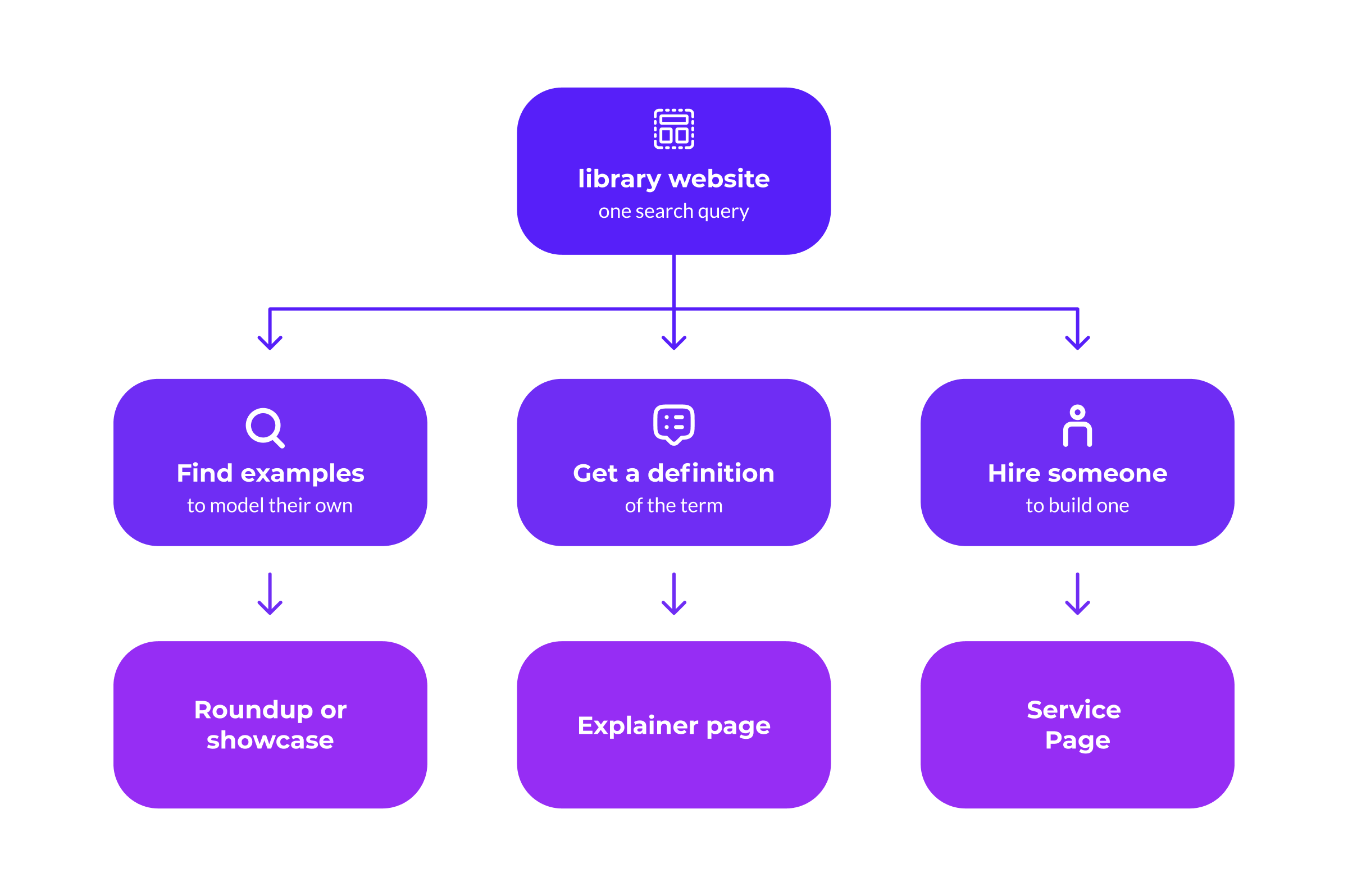
Search intent is the goal behind a query. Someone searching "library website" could want examples to model, a definition of the term, or a company to build one. Each goal calls for a different page.
The same search can carry different goals, and each one is served by its own page.
Before writing, identify which intent your page serves, then match the format to it. A comparison piece, a definition, and a service page each answer a different version of the same search. A page that targets one intent clearly tends to outperform one that tries to cover all of them.
Keeping content current and avoiding thin pages
Search engines favour content that stays accurate, and they assign little value to thin pages that carry minimal information. Review your content on a schedule: update pages with outdated facts, combine pages that cover the same topic, and remove or redirect pages that no longer serve a purpose.
This maintenance grows demanding for teams managing hundreds of pages across a university, agency, or nonprofit site. Artificial intelligence can take on the repetitive parts, and editors can lean on AI to generate and update titles, descriptions, and alt text at scale, then review the output before it publishes.
Building topic authority over time
Google associates websites with the topics they cover in depth. Publishing a connected set of pages on a subject, linked to one another, signals that your site is a substantial resource on it. This is how sites come to rank for competitive terms: by building depth across related content over time, rather than depending on a single page.
Linking best practices for a search-friendly website
Links shape how search engines read the relationships between pages, and how people move between them. Handling internal links, external links, and link attributes with intent supports both audiences.
How internal links help users and search engines
Internal links point from one page on your site to another. They help visitors reach related content, help Google find pages it might otherwise miss, and indicate which pages you treat as important. A page linked from many places across your site reads as more significant than one with few links pointing to it.
Link from your high-traffic pages to the pages you want to promote, and use descriptive anchor text that tells the reader where the link leads.
Linking out to reputable sources
Linking to credible external sources gives readers a path to supporting information and adds context to your content. Choose authoritative, relevant destinations. Outbound links to quality sites don't reduce your own ranking, despite a long-running myth that they do.
When to use nofollow and other link attributes
Link attributes tell Google how to treat a link. Apply rel="nofollow" to links you don't want to pass ranking signals, rel="sponsored" to paid or advertising links, and rel="ugc" to user-generated content like comments. Using these correctly keeps paid and unvetted links from affecting your site's standing in search.
SEO for website redesigns and CMS migrations
A redesign or platform migration changes your URLs, your content structure, or both, and that creates the highest risk of losing search traffic. Rankings you've built over years can drop within weeks if search engines lose track of your pages during the move.
Protecting rankings during a redesign
The work that protects your rankings happens before launch. Three steps matter most:
- Create a complete map of your current URLs and where each one will live on the new site.
- Identify the pages that bring in the most search traffic, and confirm each has a destination on the new site.
- Set up monitoring in Google Search Console so you catch indexing or traffic problems in the days after launch.
A redesign that loses its search traffic usually does so because this preparation was skipped.
Redirects, URL changes, and common migration mistakes
When a URL changes, a permanent (301) redirect sends anyone who visits the old address to the new one and transfers the page's accumulated ranking value.
It works like mail forwarding: the old address keeps pointing people to the current one. For a large rebrand, Google recommends moving in two phases, completing the move first and launching the redesign second, so visitors and search engines absorb one change at a time.
The common mistakes are redirects that were never set up, pages that return errors after the move, and old links that lead nowhere. Checking each of these before launch keeps a migration from turning into a traffic loss.
Why SEO still matters for generative AI search
Generative AI features like AI Overviews and AI Mode have changed how search results look, and they've raised a fair question: do SEO fundamentals still matter?
Google's generative AI guidance confirms these features run on the same core Search ranking and quality systems, so there's no separate track to optimize for.
That's good news. The same fundamentals prepare you for AI search like a clear technical structure, helpful content built on first-hand expertise, and pages that load and read well. Google's systems draw on those signals whether they're ranking a link or assembling an AI answer.
It also means you can ignore a lot of the "AI optimization" advice making the rounds. Google is clear about what you don't need to do:
- You don't need an llms.txt file. Google Search ignores it.
- You don't need to break your content into chunks for AI to read it.
- You don't need to rewrite pages in "AI-friendly" language, since these systems understand synonyms and natural phrasing.
- You don't need structured data for AI features, though it still helps your content show up in other ways.
Chasing these "answer engine" or "generative engine" optimization hacks pulls effort away from the actions that drive visibility. Google's own first next step says it plainly: apply SEO best practices to generative AI search.
When to bring in SEO expertise
You can handle a lot of SEO work in-house. Certain situations call for specialized support, either because the problem is hard to diagnose or because the cost of getting it wrong is high.
Signs your website needs an SEO audit or roadmap
Consider an SEO audit or a dedicated roadmap when:
- Search traffic has declined over several months with no obvious cause.
- You're about to launch a new site or a major new section.
- Content that should rank well is underperforming.
- You're facing technical problems that are difficult to diagnose internally.
Take a months-long traffic decline. It could come from a Google algorithm update, a migration that dropped its redirects, or content that's aged out of relevance, and separating those causes is the kind of diagnosis an audit is built for.
An audit identifies and prioritizes the issues. A roadmap sequences the fixes so they get done alongside everything else competing for your team's time.
How ImageX builds search-friendly digital experiences
Site structure, page performance, content quality, and accessibility are decided early in a website project. SEO holds up best when it's built into the design from the start, because adding it after launch means reworking decisions already made.
That's the approach we take at ImageX. We help higher education, government, business-to-business, and nonprofit organizations build Drupal websites that are straightforward to use, manage, and crawl. Good SEO for Drupal websites starts there, in the build, where the architecture and content model are set. When those foundations support search from day one, visibility comes from the structure itself.
If you're planning a redesign, or trying to understand why your search performance has dropped, get in touch. We'll review your site with you and help you decide where to start.