
Content Governance: What It Is and How to Build a Plan That Lasts
- What is content governance?
- Why is content governance important?
- The core elements of a content governance framework
- How to create a content governance plan in 6 steps
- How to govern AI-generated content
- Website content governance for multi-department organizations
- Where your CMS fits (and what it can't do)
- Content governance FAQs
- Establish governance before your next redesign
If your website has grown hard to manage, a rebuild starts to look like the fix. The problems look structural, with hundreds of orphaned pages, multiple versions of the same policy document, and a dozen editors who each have their own idea about tone. A fresh build promises a clean slate, and clearing the clutter in one project sounds easier than untangling it page by page.
A rebuild alone doesn't deliver that clean slate for long. The problems on the old site came from the way content gets published rather than from the design. Without rules for who publishes what, how, and for how long, the new site starts collecting the same problems on launch day.
Those rules are content governance. This guide covers what the term means, the four elements of a working framework, and a six-step process for building a governance plan your team can follow. If you're weighing a redesign, this is the place to start.
What is content governance?
Content governance is the system of policies, roles, workflows, and standards that determines how an organization creates, approves, publishes, maintains, and retires its content. It assigns ownership and decision-making authority so that quality stays consistent as teams grow and content volume climbs.
In practice, governance answers four questions:
- Who decides what gets published?
- Who creates, reviews, and approves content?
- What standards does every page meet?
- How long does content live before someone reviews or removes it?
Content management is the everyday activity of writing, editing, and publishing. Content governance sets the rules for all of it. Teams can manage content for years without governing it, and the evidence piles up as duplicate pages, abandoned sections, and a voice that changes from one department to the next. Visitors who find two versions of a policy can't tell which one is current, and every contradiction they notice makes the rest of the site harder to trust.
Content strategy vs. content governance
The two terms get used interchangeably, but they really answer different questions.
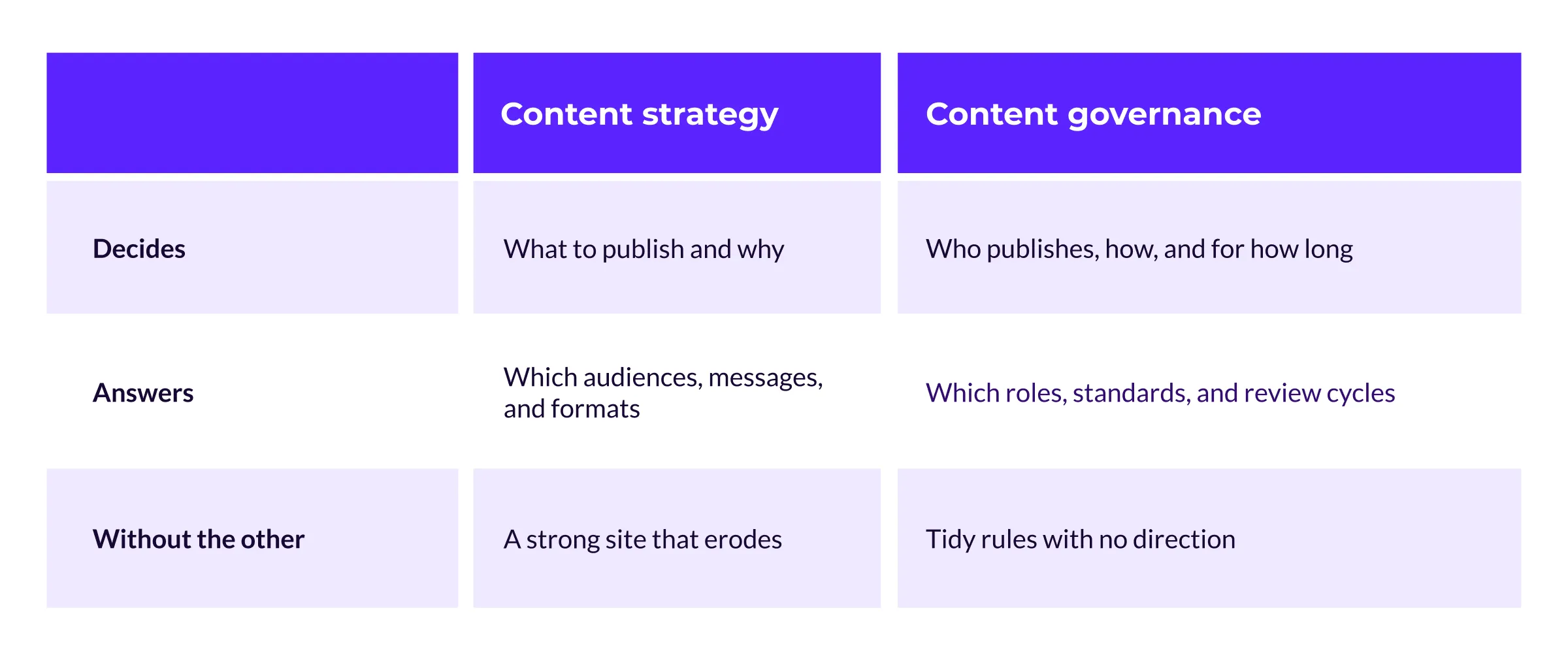
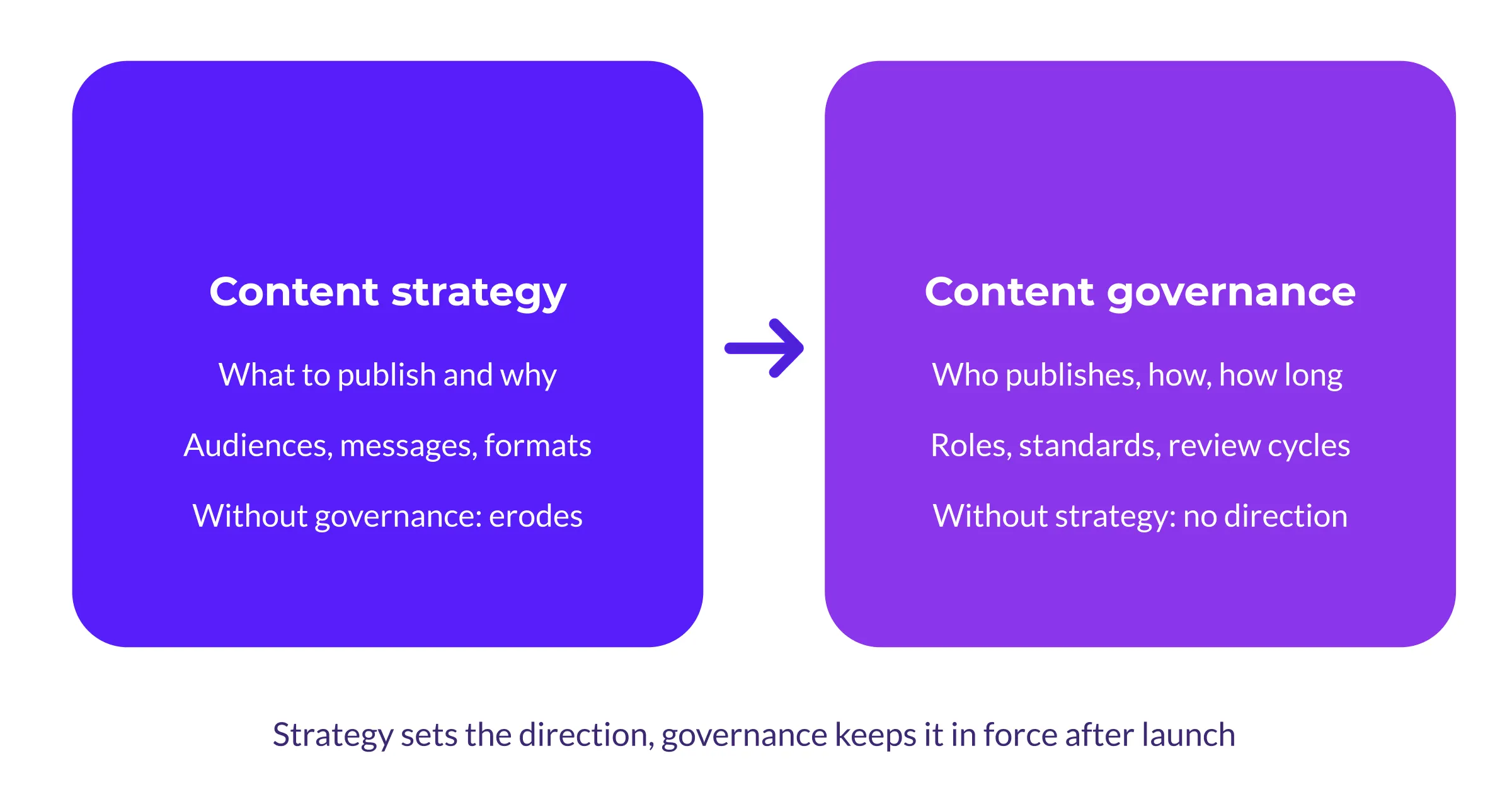
Strategy gives governance a direction, and governance keeps that direction in force after launch. In many of the projects we take on, governance is a piece that's missing. The budget covers a strategy document and new templates, and the rules for maintaining the site after launch never get written.
Why is content governance important?
The benefits of governance grow with the number of editors and pages involved. A university website spreads publishing across faculties, admissions, athletics, and research, and can run to thousands of pages maintained by dozens of editors.
When those editors follow no shared standards, each department develops its own habits, and the site grows less consistent with every page added.
Governance brings that growth back under control. The benefits show up in five places:
- Consistency across authors: Departments write to the same standards, so the site reads like one organization instead of twelve.
- Accuracy that holds up: Review cycles catch outdated fees, expired programs, and broken links before your visitors do.
- Lower compliance risk: Accessibility is a clear example. Under the ADA's web accessibility rule, state and local governments, including public colleges and universities, must meet WCAG 2.1 AA by April 2027 or 2028, depending on size.
- Faster publishing: Named owners and tiered approvals remove the bottleneck where every update waits on one overloaded reviewer.
- Search and AI visibility: Search engines reward pages that stay current and structured, and AI-generated answers cite the same kind of page. That pattern is the basis of answer engine optimization, and governance is how a site sustains it.
Each of these benefits comes from the same place. Someone decided who owns a section or which standard applies, wrote the decision down, and made a person accountable for it. Software can hold those decisions in place once a person has made them.
The core elements of a content governance framework
A content governance framework is the structure that holds those decisions together. Frameworks vary from one organization to the next, but a working content governance strategy includes the same four elements.
Roles and ownership
Start with one accountable name. That might be a head of content, a digital director, or a communications lead. A committee can advise and coordinate, but one person needs the final say, because decisions stall when accountability is shared. Around that person, give each department an editor who owns their section.
Where authority sits depends on which governance model you choose. There are three common models:
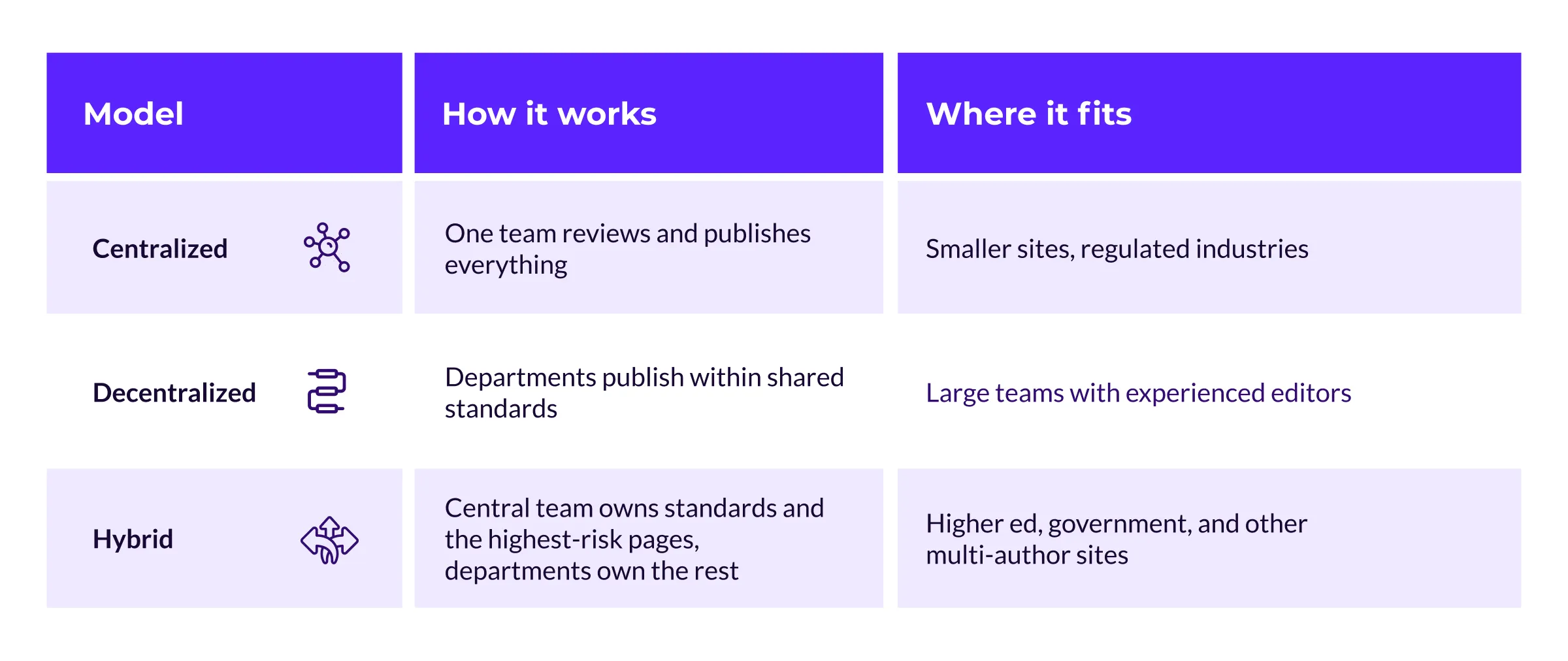
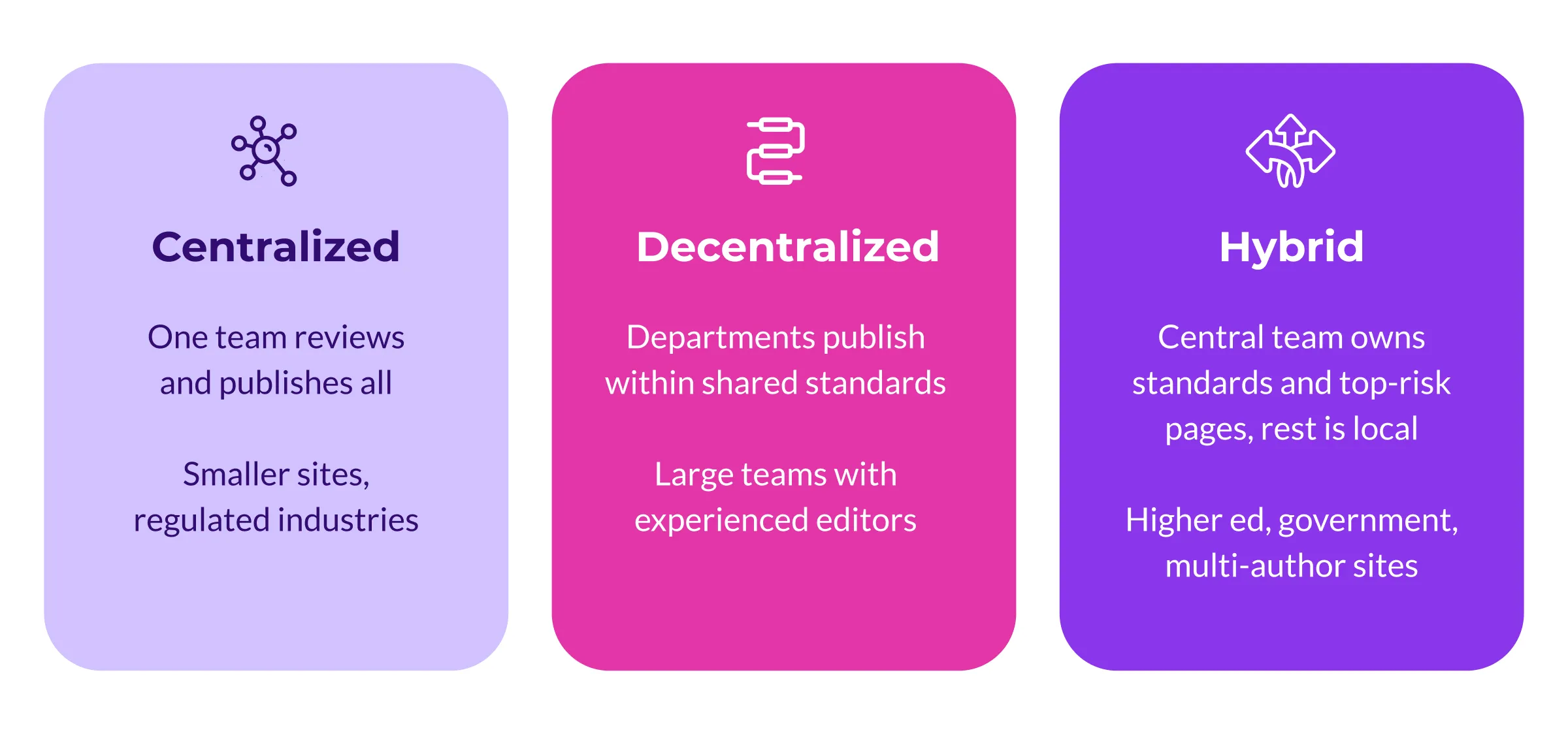
The hybrid model is common in higher education and government projects. A central web team owns the homepage, the admissions section, and the standards everyone follows, and each faculty maintains its own program pages within those rules.
Standards and guidelines
Standards tell every author what quality means before they start typing. A useful set covers:
- Voice and style, with a before-and-after example for each rule
- Formatting for headings, links, and images
- Accessibility requirements, including alt text and heading structure
- Metadata, covering page titles, descriptions, and taxonomy
Set the bar where search engines set theirs. Google's guidance on people-first content asks whether a page offers original information, identifiable authorship, and accuracy a reader can check.
Write your standards around those criteria, and a page that passes Google's tests will also give a visitor a named author, verifiable facts, and information they can't get elsewhere.
Workflows and approvals
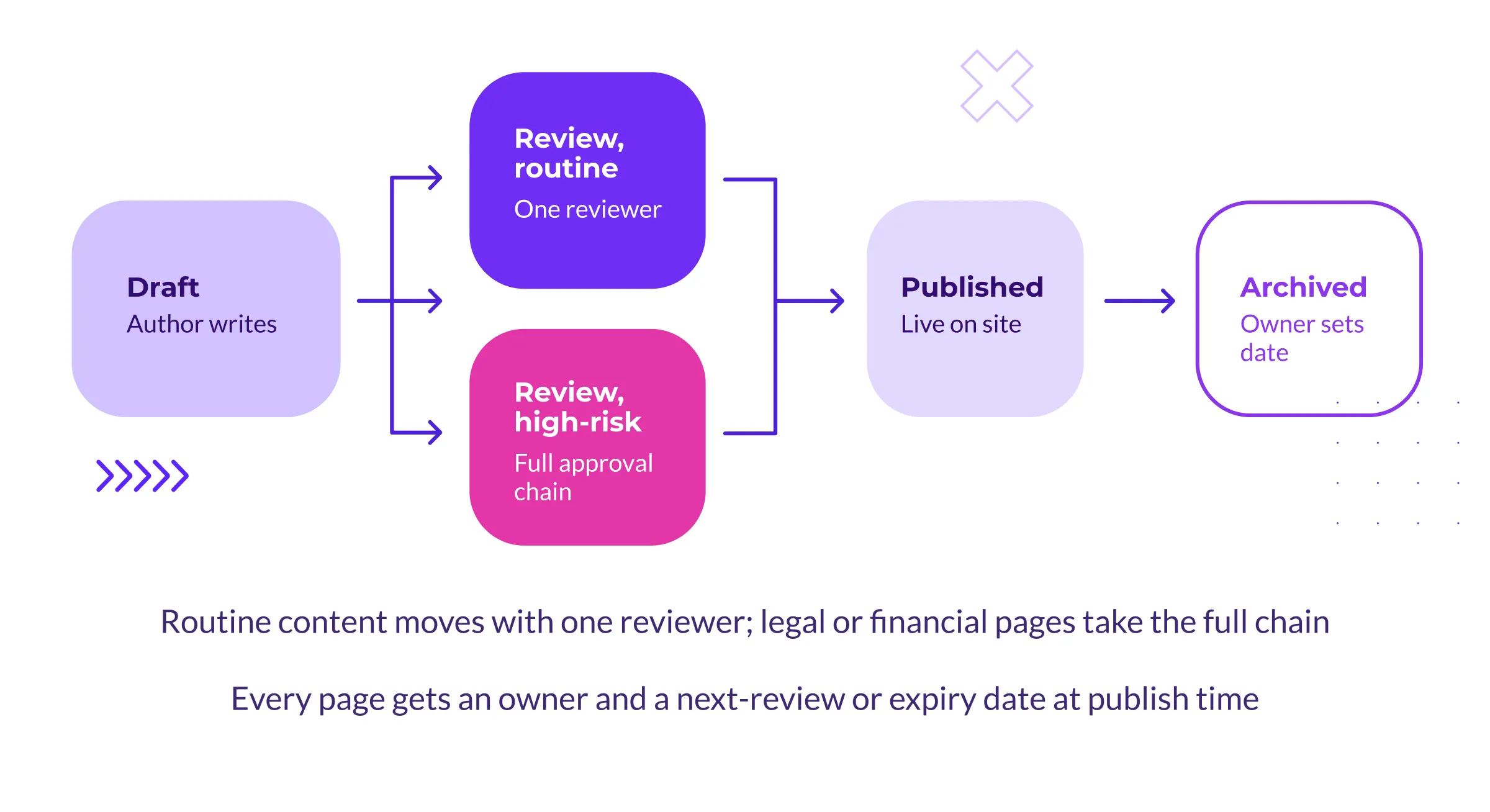
A workflow maps the route from draft to published page and names who moves content along it. Avoid a single approval chain for every content type, because a blog post and a tuition policy carry different risks.
One reviewer is enough for routine updates, while pages with legal or financial weight can justify more than one. Build in an escalation path as well, for content the workflow doesn't anticipate, like an emergency notice that has to be published the same day or a leadership request that skips the usual queue.
Content lifecycle rules
Every page needs an owner and a next-review date. Time-bound content, like event pages and application deadlines, needs an expiry date and an archive rule. Agree on removal criteria before you need them.
A page with no owner, no traffic over the past year, and no purpose a visitor would recognize is a candidate for removal. With lifecycle rules in place, cleanup happens a little at a time instead of piling up into a separate cleanup project.
How to create a content governance plan in 6 steps
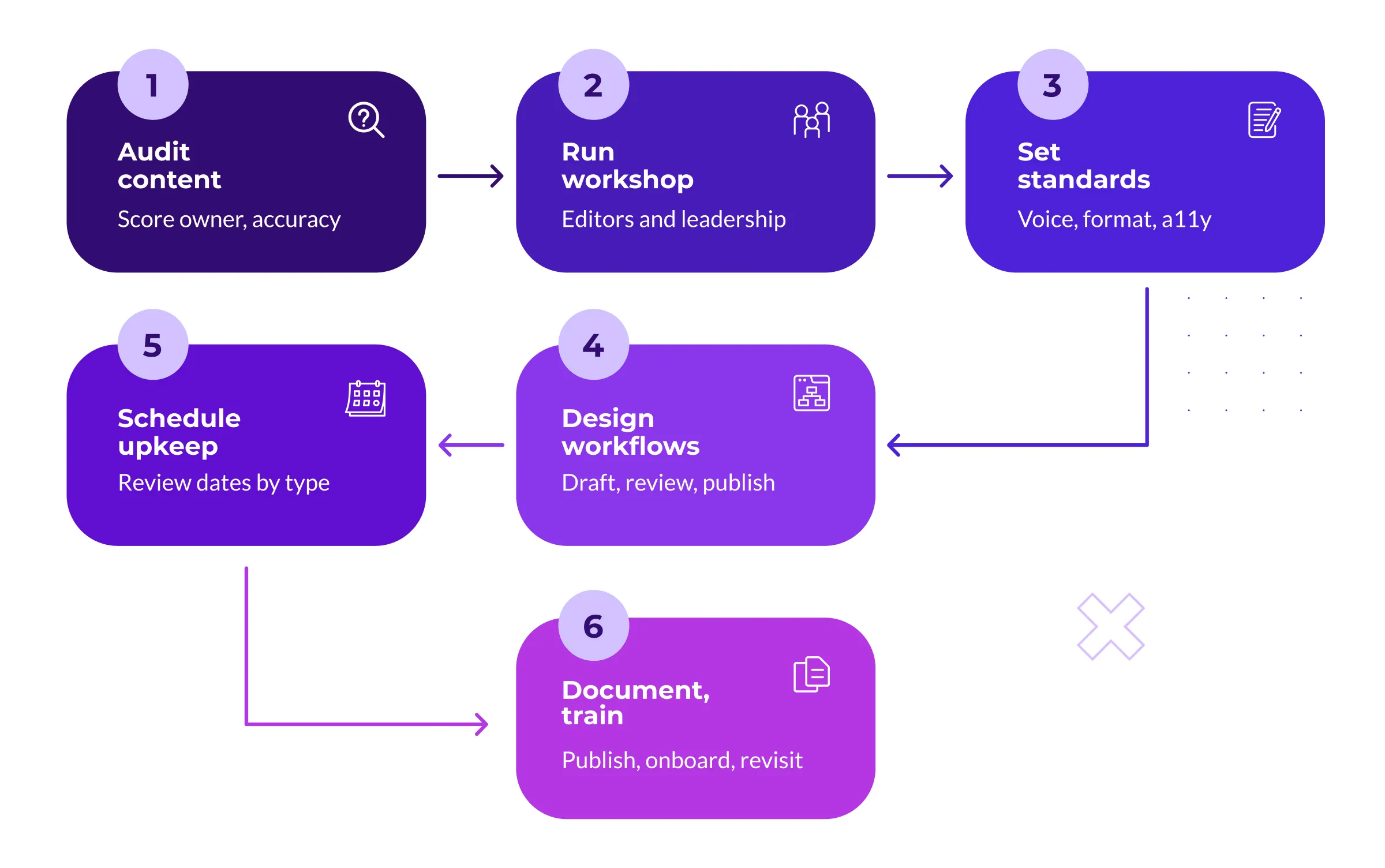
The four elements above are what you're building. This is the process we use to put them in place with clients, step by step.
Step 1: Audit the content you have
Ownership and lifecycle rules attach to individual pages, so the first step is an inventory of every page, file, and PDF. Score each entry:
- Owner: who answers for this page?
- Accuracy: what on it is out of date?
- Performance: do analytics show visits or conversions?
- Verdict: keep, update, merge, or remove
The first audit is an eye-opener. In the audits we've run, the first pass turns up orphaned sections, duplicate policies, and pages whose last update predates the people maintaining them.
From there, digital teams treat a yearly content audit as the baseline.
Step 2: Run a governance workshop
Departments that had no say in the rules have little reason to follow them, so a governance plan written by one team and handed down to everyone else starts at a disadvantage.
Before anything gets documented, put department editors, marketing, IT, and leadership in one room. Use the session to agree on who your audiences are, to name what slows publishing today, and to assign ownership of each section in front of the group.
Bring in a facilitator from outside the organization if you can. An outside facilitator can ask each department, without history or politics attached, what its section of the website is for. In the workshops we've run, departments defend fewer of their pages once the analytics for each section are on the screen, and ownership questions that stalled for months get settled.
Step 3: Set your content standards
Write standards your editors can apply while they write, which means keeping the document short and the rules concrete. The Canada.ca style guide runs a national government's web presence on rules as plain as sentences under 20 words and one idea per paragraph.
Cover voice, formatting, accessibility, and metadata, and give every rule a before-and-after example so editors can see the difference instead of interpreting it.
Step 4: Design review and approval workflows
Turn the workshop's ownership decisions into named states, such as draft, review, published, and archived.
For each transition, name the role that approves it. Then match the amount of review to the risk of the page. Routine updates can move with a single reviewer, while pages with legal, financial, or policy implications go through the full chain.
A process that treats every change the same slows routine updates and gives editors a reason to publish around it.
Step 5: Schedule ongoing maintenance
A governance plan proves its value in the months after launch.
Set review dates that match each content type. High-traffic service pages might need a check every quarter, evergreen material once a year, and events and deadlines an automatic expiry date.
Assign each check to a role rather than a person, so the schedule survives staff turnover. If your CMS can schedule unpublishing, use it, so an expired page comes down on its end date without anyone needing to remember.
Step 6: Document, train, and revisit
Publish the plan wherever your editors spend their day, whether that's the intranet or the CMS dashboard, and build it into onboarding. Train on it at two moments, when someone joins and when the rules change.
Training holds up better when the editing tools repeat the same rules. Editors can run accessibility checks in Drupal while they write, which flags missing alt text and broken heading structure before a page reaches review, and turns an annual training topic into a daily prompt.
Put the plan itself on the annual review calendar. If the rules stop matching how the team publishes, editors will drop them, so update the plan alongside the yearly audit.
How to govern AI-generated content
AI multiplied how much content teams can produce without changing how much they can review. 95% of enterprise marketers use AI-powered tools, yet fewer than a third describe their organization's AI program as established, which means adoption has moved faster than the rules meant to govern it.
An AI policy belongs inside your governance plan rather than in a separate document, because the same people and workflows handle both. Five decisions cover it:
- Approved tools and uses: which systems, for which content types.
- Human review: someone accountable reads every AI-assisted draft before it publishes, with no exception for volume.
- Verification: every fact, figure, and link gets checked against a source, because language models invent citations with confidence.
- Disclosure: decide when and how you tell readers about AI involvement, and apply it the same way every time.
- Voice: your standards apply no matter what wrote the first draft.
You don't need to draft this from a blank page. NIST's generative AI profile maps the risks, confabulation and information integrity among them, and suggests controls to adapt.
AI-assisted content goes through the same review gates as everything else. What changes is the number of drafts arriving for review, so those gates need to be in place before that number climbs.
Website content governance for multi-department organizations
Governance gets harder as more teams publish to the same website. Universities, municipal governments, healthcare networks, and nonprofits with regional chapters all deal with the same conditions. Authority is spread across departments, each one publishes on its own schedule, and the website is bigger than the team responsible for its quality.
At this scale, three moves matter more than any template:
- Central standards, local ownership: The core team owns the rules and the pages where errors cost the organization, such as admissions requirements or tuition. Departments own their content within those rules.
- Permissions that mirror the org chart: Tiered access gives each editor an individual account, so a lab coordinator can edit lab pages and nothing else.
- Review cycles with named owners: Distributed publishing holds together when one person in each department answers for their section.
A university takes this pattern the furthest, with every faculty, lab, and student service running its own corner of the site, and we wrote a separate guide to governance for higher education for that reason. Governance is also one part of a wider set of decisions about strategy, audiences, and platforms, and our higher education website guide covers how those pieces fit together.
Where your CMS fits (and what it can't do)
A CMS can't govern content on its own. No platform can set your standards, name your owners, or settle a dispute between admissions and the provost's office, because each of those calls needs a person with the authority to make it.
What a CMS does well is enforce decisions once people make them:
- Role-based permissions that control who edits and who publishes
- Editorial states, so a live page and its draft revision coexist
- Required fields, like alt text on images, so standards hold by default
- Scheduled publishing and unpublishing, so expiry dates execute themselves
In Drupal, content moderation workflows handle the states and transitions in core. A site can run draft, review, published, and archived states, each gated by role, without custom development. Configuring them takes far less time than agreeing on what the states and roles should be, which is what the workshop and the six steps are for.
The same logic applies if you're evaluating a new platform. Ask how it handles permissions, moderation states, required fields, and scheduled unpublishing, because those four features are what turn a governance plan from a document into default behaviour.
Content governance FAQs
Who owns content governance?
Assign accountability to a single person, a head of content or digital director in many organizations, and back them with a cross-department group that meets on a schedule. Without a named owner, a committee has no one whose job is to turn discussion into decisions.
How often should you review a content governance plan?
Review the plan once a year, alongside your content audit. Individual pages follow their own lifecycle rules, which can mean quarterly checks for high-traffic content and expiry dates for anything time-bound.
What is the difference between content governance and content management?
Content management is the everyday activity of writing, editing, publishing, and updating. Content governance sets the rules around that activity, including who approves changes, which standards apply, and when content retires. A CMS can handle much of the first, but the second is decided by people.
What should a content governance document include?
A governance document needs six sections. Cover roles and owners, content standards, the workflow map, lifecycle rules, your AI policy, and escalation contacts. Keep it under 20 pages and link out to supporting detail so editors keep using it.
Establish governance before your next redesign
A redesign changes how the website looks and how it's built, while your organization's publishing habits carry over unchanged. If the same editors follow the same habits with no new rules, the problems that made the old site hard to manage will return on the new one.
Putting governance ahead of the rebuild protects the redesign budget. Audit your content, set the rules, and then rebuild, so the governance plan doubles as the brief for which content moves to the new site. Our website migration guide covers that planning in detail.
If you want a second set of eyes on your content operations, or a facilitator for that first workshop, talk to us. We've helped universities, governments, and B2B teams put governance plans in place that their editors still use.