Drupal 10 End of Life: Upgrade or Rebuild?

Drupal 10 reaches end of life (EOL) on December 9, 2026. After that date, no new releases will ship, and the security patches and bug fixes most teams rely on will stop arriving. If your organization runs on Drupal 9 or 10 today, you've probably started thinking about what comes next.
For most teams, the answer is some version of "upgrade, hand it off, get back to the roadmap." That's a reasonable plan when the site is in good shape. It's a quietly expensive plan when the site has drifted from what the organization needs it to do, because the technical work takes precedence over the strategic work that should have come first.
This guide works through what changes when Drupal 10 stops being supported, the questions you should ask before scoping a project, and the two paths most organizations end up choosing between.
- What Drupal 10 End of Life Means for Your Site
- Why a Straight Upgrade Is the Easy Answer (and Sometimes the Wrong One)
- Five Strategic Questions to Ask Before You Commit to a Path
- Two Paths Forward, and How to Tell Which One Fits
- Turning a Deadline Into a Decision
What Drupal 10 End of Life Means for Your Site
The day after the end of life, your site keeps running. The shift happens around the site, not to it, and it shows up over the months that follow rather than all at once.
The Drupal 10 End of Life Timeline and the Drupal 11/12 Release Cycle
Starting with Drupal 10, the project moved to a predictable two-year release cycle. Each major version gets roughly two years of active support, then another two years of maintenance and security coverage before reaching end of life.
The December 9, 2026 deadline lines up with the Drupal 12 release. Drupal 10.6.0 is the last minor version, and once Drupal 12 ships, no further Drupal 10 releases will follow.
Sites still on Drupal 9 are already past end of life and need to start moving now. Sites on Drupal 10 have a runway measured in months, with planning work that should be underway well before the deadline arrives.
What Happens When Drupal 10 Support Ends
Stakeholders panic about the end of life because the language sounds catastrophic. In reality, the changes are slower and less dramatic, but they pile up:
- Security patches: Drupal 10 stops receiving fixes for newly discovered vulnerabilities
- Contributed modules: Community focus shifts to the current major version, and modules you depend on gradually stop releasing Drupal 10 compatible updates
- Hosting and partner support: Enterprise hosts continue to support Drupal 10 for a period, but their best engineering and support effort moves to current versions
- Compliance posture: For regulated sectors like healthcare, government, and finance, running unsupported software starts to create audit issues
None of these arrive on day one. They accumulate, and the cost of inaction compounds the longer the upgrade gets delayed.
Who Is Most Affected
Some sites feel the impact harder than others. Plan most carefully if your site:
- Runs heavily customized Drupal builds with significant amounts of bespoke code
- Operates in a multi-site environment where coordination across properties adds project complexity
- Carries technical debt from earlier migrations that was never fully cleaned up
- Sits in a regulated industry where unsupported software triggers compliance flags
Two or more of those, and the runway between now and December 2026 is shorter than it looks.
Why a Straight Upgrade Is the Easy Answer (and Sometimes the Wrong One)
Drupal's continuous upgrade path makes the move from version 10 to 11 or 12 straightforward. Deprecated APIs and architectural changes are flagged in advance, and well-maintained sites can move forward with relatively contained effort. Nothing about this resembles the painful Drupal 7 to 8 migration that older teams remember.
But when the technical work is straightforward, the strategic conversation that should accompany it tends to get skipped, and you can end up with a fresh version number running essentially the same site you had before.
Reflection on a few questions usually surfaces whether that's the situation:
- When was the last time anyone reassessed the information architecture against how users actually behave on the site today?
- How much of the custom code exists because someone three years ago needed a workaround that nobody has reviewed since?
- When did the CMS last help ship a new business goal versus quietly making it harder?
A straight upgrade carries forward everything already on the site, including the awkward workflows, the orphaned functionality, the integrations held together with tape, and the technical debt accumulating quietly underneath. The site looks the same after the upgrade because, structurally, it largely is.
The costs show up later. New features, campaigns, and integrations shipped on a site carrying technical debt take longer and cost more than they should. Upgrading without addressing the underlying issues commits the organization to paying that tax for another major version cycle, which is usually four years or more. The budget that didn't get spent on website modernization now becomes the budget that gets spent inefficiently on everything else.
Five Strategic Questions to Ask Before You Commit to a Path
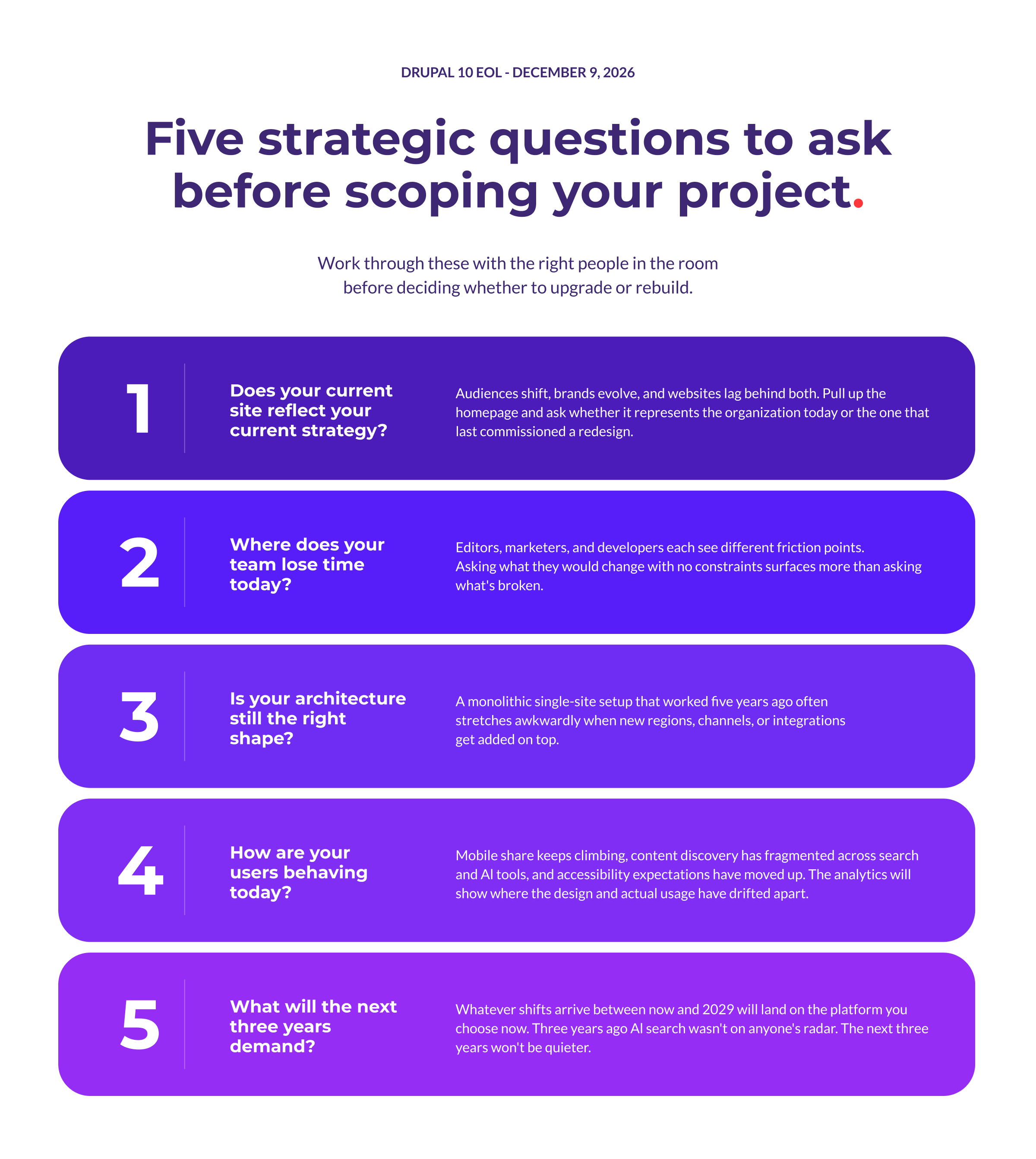
Before deciding whether to upgrade, rebuild, or do something in between, work through these five questions with the right people in the room. The answers tend to surface the conversations that need to happen internally before any project gets scoped.
1. Does Your Current Site Reflect Your Current Strategy?
Three to five years can be a long time in business. Audiences shift, brands evolve, and new product lines or revenue models leave fingerprints on a website that accumulate over time. The site usually keeps working, but it gradually starts to represent the organization you used to be more than the one you've become.
A quick check you can do is pull up the homepage and look at it the way a first-time visitor would. The positioning, the imagery, the language, the structure. Is that the story the leadership team would tell about the organization today, or is it the story from the last redesign? When the answer is the second one, the gap between site and strategy is usually wider than anyone realizes.
2. Where Does Your Team Lose Time Today?
The people who use the CMS every day are the best source of information about what's working and what isn't. Editors see how awkward certain content types are to update, marketers run into the same workflow friction over and over, and developers carry mental maps of which custom code makes them nervous. Each role catches a different slice of the same site, and the picture gets clearer when their observations get pulled together.
A useful conversation here is open-ended rather than diagnostic. Asking "what's broken?" tends to surface the obvious things, while asking "what would you change if there were no constraints?" surfaces the more interesting things, including the kinds of friction that have been around so long they don't register as problems anymore. Both kinds of feedback matter, and both help separate questions about the software itself from questions about how this particular site was built.
3. Is Your Architecture Still the Right Shape?
A lot of enterprise sites are built around assumptions that quietly expired. The monolithic single-site setup with a few tightly coupled integrations was a reasonable choice when websites were the only digital channel anyone cared about, the organization had one brand to manage, and the integration surface was small.
As any of those conditions change, the architecture has to stretch in ways it wasn't designed for.
That stretch shows up in the small inefficiencies that pile up over time. The stretch shows up in the small inefficiencies that pile up over time. Content that should live in one place gets duplicated across three. New regions and sub-brands get bolted on with workarounds. APIs end up serving mobile apps and partner systems they were never designed to support, and each new connection makes the next one more fragile.
End of life is one of the cleanest opportunities to reset the architecture, and the natural starting point for conversations about headless approaches, multi-channel content delivery, and how Drupal fits into a broader digital ecosystem.
4. How Are Your Users Behaving Today?
User behaviour shifts faster than websites do, and five years is enough time for the way people interact with a site to change in ways that make older assumptions look outdated. Mobile share keeps climbing, content discovery has fragmented across search and AI tools, attention spans on long-form content keep dropping, and accessibility expectations have moved up considerably.
Most of the answers are sitting in your analytics. The drop-off points, the devices people arrive on, the entry pages that do most of the work, the content types that get consumed all paint a clear picture of how the site is being used now versus how it was designed to be used.
Where the picture and the design don't line up, an upgrade alone won't close the gap.
5. What Will the Next Three Years Demand?
Nobody fully knows, and that's the point.
Three years ago, AI search wasn't a meaningful part of how anyone found products or information. Most enterprise content teams hadn't yet absorbed the volume increase that came with generative AI tools. Multi-region content governance was a nice-to-have at most organizations rather than a baseline expectation. The teams that built websites in 2022 made reasonable decisions against the information they had, and most of those decisions look incomplete now.
There's no reason to expect the next three years will be kinder. The platform chosen at this end of life will be running through the next major release cycle, which means whatever shifts arrive between now and 2029 will land on it. Flexibility, modular architecture, and a CMS that doesn't lock you into a specific vision of how the web works become the actual deliverable, more than any particular feature.
Two Paths Forward, and How to Tell Which One Fits
After working through the strategic questions, your Drupal migration strategy usually becomes clearer. For most organizations, the decision comes down to two options.
Path One: Upgrade in Place to Drupal 11 or 12
This is the right path when the strategic questions come back mostly clean. The site is doing what the organization needs, the team isn't fighting the implementation, the architecture is still serving the work, and the roadmap for the next few years looks achievable on the platform as it stands.
End of life is the deadline that drives the project, but there isn't a strategic case for doing more than the upgrade itself.
In practice, an in-place upgrade is a contained piece of work. The team handles the upgrade from Drupal 10 to Drupal 11 (or directly to Drupal 12 once it's released), addresses any deprecated APIs or modules that need updating, and picks up Drupal 11 benefits along the way, including the modernized admin UI, stable Workspaces for content staging, and AI-assisted features. The shape of the site stays the same, what changes is the version underneath.
An upgrade in place doesn't fix anything that wasn't already working, which is fine when the answer to "what's broken?" is genuinely "not much."
Organizations that choose this path tend to be ones with healthy implementations and a recent enough investment in the site that another rebuild would be wasted effort.
Path Two: Rebuild on Drupal With a Strategic Refresh
This path is the right call when the strategic questions surfaced real misalignment between the site and the organization. The platform isn't the issue, but the implementation has aged into something that gets in the way more than it helps. The cost of working around the existing site has started to outweigh the cost of rebuilding parts of it properly.
A rebuild keeps what works (Drupal's flexibility, security model, content modelling, and ecosystem) and modernizes what doesn't:
- Design system: Refreshed components built to scale across properties
- Information architecture: Structure grounded in current user behaviour rather than legacy assumptions
- Integration layer: Cleaner connections between Drupal and CRM, marketing automation, and analytics tools
- Content model: Structure that supports the channels actively being published to
This is also the moment to revisit Drupal's role in the architecture. For organizations delivering content to multiple front ends, headless Drupal and decoupled approaches put Drupal at the centre of a more flexible setup, with modern front-end frameworks handling the experience layer.
The right architectural shape depends on what you need to ship between now and the next end of life.
A rebuild is a bigger project than an upgrade, and the case for it has to be grounded in something more than "the site feels old."
When the strategic questions point to misalignment between site and organization, the rebuild makes sense. When they don't, Path One is the better answer. Working with the case for Drupal (flexibility, scalability, security, no licensing fees, a global developer community) means the platform decision is already made. You just need to decide what to build on it.
Turning a Deadline Into a Decision
Organizations that use end of life well treat it as a checkpoint, looking carefully at the site, the strategy, the team, and the roadmap, and making a deliberate decision about which path forward fits. Sometimes that's a clean upgrade or a deeper rebuild. Either way, the decision gets made with eyes open, and the work that follows is grounded in strategy.
If you'd like to think this through with people who do it every day, talk to our team. We help organizations navigate this kind of inflection point regularly, and we'd be glad to be part of the conversation.
Contributors