B2B Web Design Best Practices: A Guide to High-Performing Websites
- What are B2B web design best practices?
- Why B2B web design is different
- Common B2B web design mistakes
- Start with B2B website strategy (practices 1 and 2)
- Content and messaging (practices 3 to 5)
- UX and navigation (practices 6 to 8)
- Design and trust (practices 9 and 10)
- Conversion planning (practices 11 and 12)
- Performance, accessibility, and mobile (practices 13 to 15)
- Where web development fits into a B2B redesign
- Planning a B2B web redesign
- How to choose a B2B web design agency
A business-to-business (B2B) website can look expensive and still lose deals. The design holds up in a pitch deck, the brand photography is strong, and the pipeline stays flat anyway. What separates an attractive website from a high-performing one has less to do with visual taste than with decisions about strategy, content, and structure made long before anyone chooses a colour palette.
This guide walks through those decisions. It covers how B2B buyers evaluate vendors through their websites, the mistakes that cost credibility, and fifteen B2B web design best practices spanning strategy, content, user experience (UX), and development. Use it to improve the site you have, plan a B2B web redesign, or evaluate a potential partner.
What are B2B web design best practices?
B2B web design best practices are the strategic, UX, content, and technical principles that help business buyers understand what a company does, evaluate its credibility, find the information they need, and take the next step with confidence.
They cover how a site is planned and measured, how its content answers buyer questions, how its navigation behaves, and how it performs on speed, accessibility, and mobile.
The outcome is what matters, a site that works as hard as your best salesperson during the hours nobody from your company is in the room.
Why B2B web design is different
A consumer can see a pair of shoes at lunch and own them by dinner. A company buying software or services moves through research, internal championing, budget approval, and security review, often over months and with multiple people weighing in.
Nearly all of that happens away from your sales team. Buying groups rank their shortlist before a single sales conversation takes place, and the vendor they contact first goes on to win nearly 80% of the time.
First contact now comes when buyers are about 61% of the way through their journey, which means the website carries the evaluation for a high-intent buyer until the shortlist is set. The whole B2B digital experience, from anonymous first search to signed contract, runs through pages no one will walk the buyer through.
Common B2B web design mistakes
The fixes land better once the failure patterns have names. These show up over and over in the B2B websites we audit, and each one pushes qualified buyers away quietly.
- Copy that centres the company instead of the buyer: founding dates and award lists crowd the homepage while the problems you solve sit three clicks deep.
- Evaluation answers hidden behind a sales call: withholding pricing models and integration details doesn't create conversations; it removes you from consideration before one can happen.
- Proof without specifics: a logo wall says clients exist without saying what changed for them.
- Navigation that mirrors the org chart: visitors don't know your internal structure, and they shouldn't need to.
- Design that drifts between templates: inconsistency reads as neglect, and neglect raises questions about everything else.
- A website the sales team works around: if reps build their own decks because no page is worth sending, the site is failing at sales enablement, which is half its job.
The fifteen B2B website best practices below are the corrections, grouped by discipline.
Start with B2B website strategy
1. Set measurable goals before design starts
A B2B website growth strategy starts with a number. Decide what the site exists to produce, whether that's demo requests, qualified leads, or shorter sales cycles, and record where those numbers stand today. Templates, page hierarchy, and content priorities all get easier to settle once they answer to a goal.
Goals also protect you mid-project. When a stakeholder pushes for a homepage carousel, "which number does this move?" is a kinder and faster filter than a design debate.
2. Design for the whole buying committee
B2B purchases are group decisions. A director finds you, an analyst compares you, information technology (IT) reviews your security posture, and a finance lead approves the spend, each at a different stage of the B2B buyer journey. Check that the site holds something for each of them: security and compliance documentation for the technical reviewer, pricing rationale for finance, and a shareable summary the champion can forward internally.
Content and messaging
3. Write for buyer problems, not company achievements
Does your homepage headline name a problem buyers recognize, or does it describe you? "Trusted since 1987" says nothing about whether you can fix what's broken for them.
Lead with the buyer's situation, introduce the solution, and keep company history on the about page; buyers care who you are once they believe you understand their problem.
4. Answer the questions buyers use to shortlist you
Buyers build shortlists from a few recurring questions.
- How is pricing structured, even if exact numbers vary?
- Which systems does this integrate with?
- What does implementation involve, and how long does it take?
- What does support look like after launch?
Publish the answers. An honest pricing overview keeps you in evaluations that a "contact us for pricing" wall would end.
5. Prove your claims with specifics
The same adjectives appear on vendor websites everywhere, and buyers skim past them. The strongest pages pair a named client with a measurable change and enough context that a skeptical reader can judge the fit; where you can't name clients, third-party reviews, certifications, and anonymized case studies carry weight. Thin proof is worth fixing before a redesign, since new templates can't fill an empty case study library.
UX and navigation
6. Structure navigation around buyer tasks
Website UX best practices say to label things the way visitors think, which in B2B means organizing by the problems you solve and the industries you serve rather than by internal product names.
A visitor who has never heard of your brand should be able to guess what sits behind every menu item, and card sorting with people outside your company will surface the labels outsiders misread.
7. Keep paths to key pages short
Each extra click between a buyer and their answer is a chance to lose them, so flatten the routes to your highest-value pages and crosslink where visitors naturally jump between topics. Onset's redesigned website gives buyers three clear ways into its two product lines, by measurement type, environment, and product category, so no visitor has to guess where to start.
8. Make self-serve education easy to find
Buyers doing quiet research reach for guides and documentation they can read without talking to anyone, so organize your resource centre by topic and by stage.
Gate selectively. A visitor who hits a form after every click stops clicking, while ungated content keeps working for you in search and in the artificial intelligence (AI) tools buyers increasingly ask first.
Design and trust
9. Keep design consistent across every template
Buyers rarely enter through the homepage; a blog post or pricing page is often the first impression. A design system, meaning a shared library of components, type, and colour rules, keeps hundreds of pages recognizably one site, lets editors publish without breaking the look, and makes the consistent choice the easy one when the next landing page gets built.
10. Show credibility signals buyers can verify
Trust signals work when a skeptical visitor can check them. Client logos used with permission, named testimonials, third-party reviews, and security certifications pass that test; vague badges and self-awarded superlatives don't. Give the security page particular care, because procurement teams look for compliance and data-handling details early.
Conversion planning
11. Match the call to action to the buyer's stage
A call to action (CTA) is the next step a page asks a visitor to take, and the same ask doesn't fit everyone. Someone reading a first blog post isn't ready to book a demo, and pushing them toward one teaches them to ignore your buttons. B2B conversion optimization starts with matching the ask to the intent the page attracts.
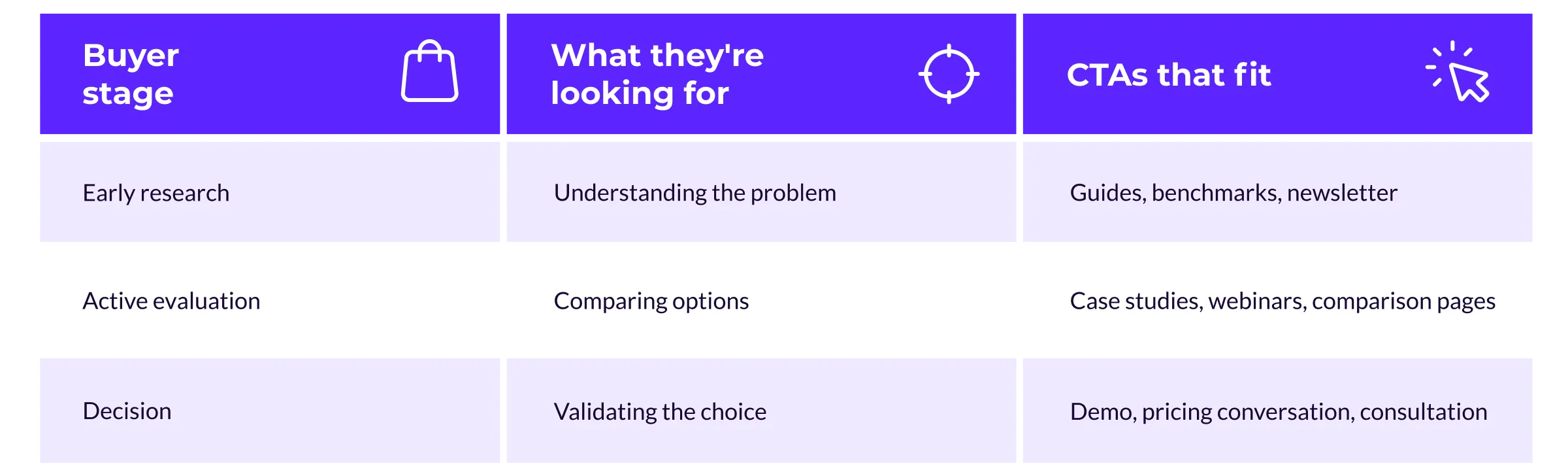
Give every page one primary CTA chosen this way, with a lower-commitment alternative nearby.
12. Keep forms short and qualify progressively
Each form field costs completions, and the cost lands on your best pages. Ask for what the next conversation needs, usually a name, a work email, and one qualifying question, and let enrichment tools or progressive profiling fill in the rest over time.
Test your forms on a phone with one thumb. If a field is awkward there, it's costing you conversions everywhere.
Performance, accessibility, and mobile
13. Treat speed as a requirement
Buyers comparing five vendors in an afternoon notice which sites keep them waiting. A 0.1-second improvement in mobile load time improved bounce rates on lead generation pages by 8.3% across a study of 37 brand sites, and the effect compounds over every return visit in a long cycle.
Set performance budgets during design rather than after launch, since image-heavy heroes and third-party scripts are decisions you can make deliberately.
14. Build accessibility in from the start
Accessibility means designing so people with disabilities can use your site, and the reference standard is the Web Content Accessibility Guidelines (WCAG), a set of testable criteria covering colour contrast, keyboard navigation, and image alternative text.
The bar across the web is low. 95.9% of home pages failed automated WCAG 2 checks this year, so an accessible site is a competitive signal as well as an obligation, and if you sell to government, education, or health care, it's often a procurement requirement outright.
Building it in from the first wireframe also costs far less than retrofitting it.
15. Design for mobile research moments
B2B research doesn't wait for a desktop. Buyers skim your site on a phone between meetings and forward pages from a train, and Google indexes the mobile version of your site first, so the phone experience is the one search engines grade. If a page matters to the buying process, review it on a phone before it ships, checking text size, tap targets, and how the forms behave.
Treat these fifteen practices as a working B2B website checklist for your next audit. To see them working together on live sites, browse these best B2B website designs and note how each one answers a buyer's questions before sales ever gets involved.
Where web development fits into a B2B redesign
Design decides what the site should do, and development decides whether it does it reliably. Treating B2B web design and development as one continuum rather than a handoff between two vendors protects everything the design got right, which is why development belongs in the project early.
Platform and content management system (CMS) choices shape what designers can propose, and the editor experience determines whether your team can keep the site current without a developer on call.
The build phase is also where B2B-specific functionality lives. B2B web portal development covers the logged-in experiences buyers and partners return to, such as client dashboards and distributor ordering, while B2B web application development builds interactive tools like configurators and quoting flows into the site itself.
Both need role-based access, clean integration with your customer relationship management (CRM) system, and room to grow without a rebuild.
If you're weighing a standalone B2B web development agency against an integrated team, price in the coordination. Every handoff between separate design and development vendors is a place where intent gets lost; integrated B2B web development services keep the designer who made a promise in the room with the engineer who has to keep it.
Planning a B2B web redesign
A B2B website redesign succeeds or stalls on decisions made before any design begins, and the first is whether you need one at all. Four signs come up again and again.
- The numbers say so: conversions slide, organic traffic declines on the pages that drive pipeline, and paid spend rises to compensate.
- Editors fight the CMS: updates queue behind a developer, or templates are too rigid for the content your team wants to publish.
- The company outgrew the site: new offerings, new markets, or a repositioning the current architecture can't express.
- Sales works around it: reps build their own materials because the site doesn't support their conversations.
If several apply, the next question is how deep to go.
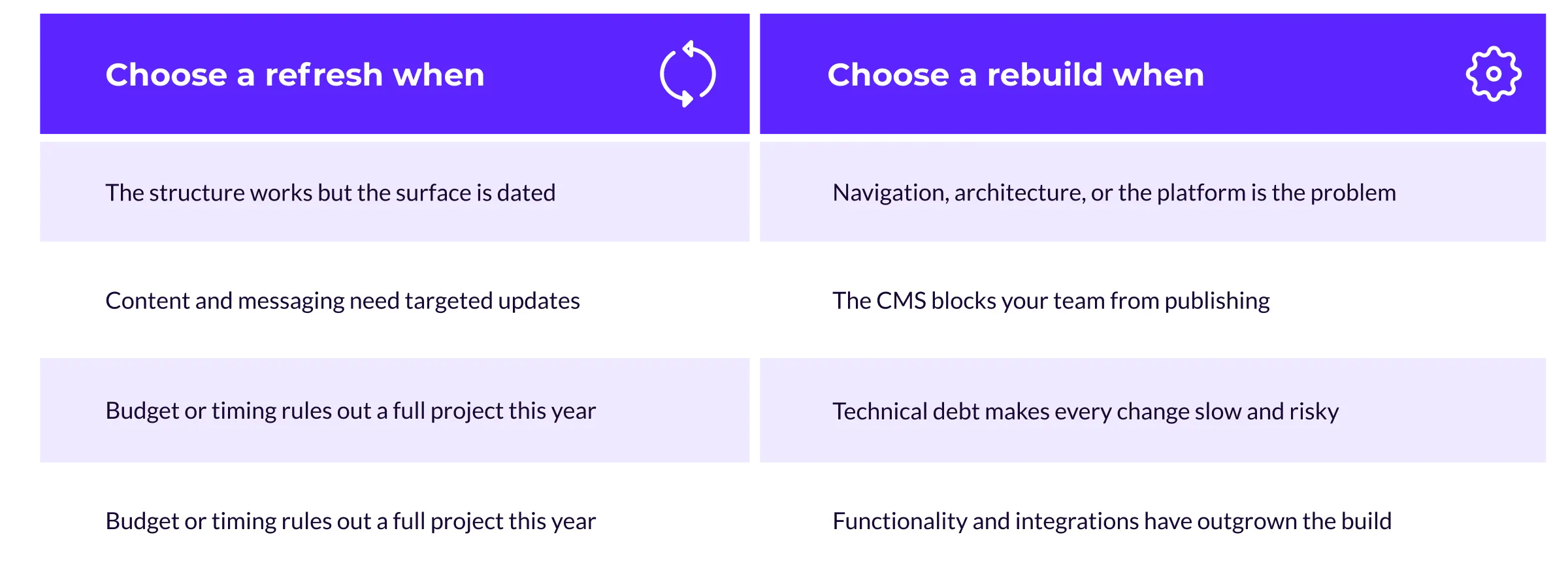
Whichever route fits, a website redesign strategy needs three things written down before kickoff: target metrics, decision rights, and scope. Work through the steps of preparing for a redesign before you brief an agency; that guide covers readiness, the refresh-versus-rebuild call, and the audits worth running first.
How to choose a B2B web design agency
B2B web design services range from template refreshes to full replatforms, so pin down scope before you compare vendors. From there, the fifteen practices double as a website design checklist for evaluation, whether you're comparing B2B web design agencies or weighing an agency against your in-house team.
- Strategy before pixels: a strong B2B web design company opens with discovery and goal-setting, and can show how strategy changed a design decision on a past project.
- Design and development under one roof: a web design and development partner that builds what it designs avoids handoff losses. Ask who owns the project after launch.
- Proof in complex sales: ask for B2B website examples with outcomes attached, involving buying committees and long cycles rather than consumer campaigns.
- Accessibility and performance by default: vendors who treat these as add-ons will bill them as add-ons, so ask how they test against WCAG and what performance budget they set.
Editor experience after launch: the site should be yours to run. Ask what publishing a new landing page takes once the agency steps back.
B2B web design FAQs
How much does B2B web design cost?
Scope drives cost more than site size does. A focused refresh of templates and key pages typically lands in the tens of thousands of dollars, while a full redesign with custom development, migration, and integrations runs into six figures. Integration complexity, content volume, and custom functionality like portals are what move estimates.
How long does a B2B website redesign take?
A mid-size project typically runs four to eight months from discovery to launch, with strategy and content setting the pace as often as design or development. Large migrations extend timelines, while a phased launch can put high-priority sections live earlier.
How is B2B web design different from B2C?
Business-to-consumer (B2C) websites usually persuade one person to make a fast, low-risk decision. B2B web design serves a group making a slow, high-stakes one, so it leans on education and proof where consumer sites lean on urgency and simplicity. The craft overlaps; the priorities don't.
Should we redesign in-house or hire a B2B web design agency?
In-house teams bring brand knowledge and speed on content, while agencies bring specialized design, development depth, and lessons from comparable builds. Hybrid models are common, with the agency leading architecture and the build while your team owns content. The deciding factor is usually capacity, because a redesign is a second full-time job for whoever leads it.
Final thoughts
An attractive B2B website and a high-performing one are built from the same materials; they differ in what gets decided first. When strategy sets the targets and the buying committee shapes the content, design has something to perform against, and development keeps the promises the design makes.
If your website looks polished but isn't producing pipeline, our web design services team can help you find out why. We keep B2B web design and development on one team, and we start every engagement with strategy rather than templates.