
Faster than Ever: Drupal’s Latest Performance Boost

Visitors form an impression of a site almost instantly. If those first moments feel smooth, they’ll keep exploring. If not, they’ll quietly close the tab. That challenge is even greater for content-rich websites, where each request can trigger complex rendering behind the scenes.
Drupal has spent years building a speed toolkit, refining how sites respond under pressure and ensuring that even the busiest pages stay fast. Across its 25-year history, Drupal has hit several milestones in this area. Each improvement layered new techniques, making performance part of Drupal’s DNA.
Now, Drupal has made the biggest leap in a decade (since the Drupal 8.0.0 release). Built on the most modern techniques and deeper core optimizations, it raises the bar for speed once again. Let’s revisit Drupal’s best speed tools and explore the new performance improvements in every detail.
The foundations: how Drupal has been going fast for years
No repeated work: caching everywhere
The philosophy of caching is simple: if the system has already done the work, don’t do it again. That’s why caching became one of Drupal’s strongest tools. Caching means saving a ready-made version of a webpage or its elements, so they can be delivered quickly instead of being rebuilt each time.
- For anonymous visitors, Drupal can serve fully rendered pages straight from cache.
- For logged-in users, most of the page is cached while personalized details remain dynamic.
- Even smaller pieces, like blocks, views, and fragments, can be cached and reused across pages.
To keep everything fresh, Drupal uses “cache tags,” like sticky notes that mark what each cached item depends on. When something changes, only the affected pieces are updated, avoiding unnecessary rebuilds.
Showing first, finishing later: BigPipe
Drupal developers realized that speed isn’t just about how fast the server works but also about how quickly users see something on their screen. This idea led to BigPipe, one of Drupal’s most visible performance wins.
BigPipe sends the page framework first, then fills in personalized or dynamic sections afterward. Visitors can start reading or interacting right away, while the remaining parts load in the background.
Some of the newer performance improvements discussed in this article are related to BigPipe, so we’ll return to it shortly.
Querying with purpose: database efficiency
Over time, Drupal’s database layer has been refined to improve how it handles queries. Views and entity queries — the tools that fetch and display content — became more efficient over time. By reducing duplication and optimizing queries, Drupal made complex, data-heavy pages faster and easier to tune.
Sending only what the browser needs: front-end efficiency
To improve website performance, Drupal also trimmed what browsers have to handle:
- Responsive images ensure devices get the right-sized files, saving bandwidth.
- CSS and JavaScript aggregation reduces the number and size of requests, speeding up page loads.
Going the extra mile: modern delivery and optimization
Drupal didn’t stop at the basics but embraced newer techniques that make sites feel fast even on shaky connections:
- Modern image formats. WebP and AVIF shrink file sizes without sacrificing quality, paired with fallbacks for older browsers, which is an essential part of Drupal image optimization.
- Lazy loading. Images and iframes load only when needed, so the first screen appears almost instantly.
- CDN integration. Static assets and cached pages can be served from servers closer to the visitor, cutting down on wait times.
- HTTP/2 and beyond. Multiplexing and server push align perfectly with Drupal’s aggregation strategies.
- Performance monitoring. Tools like WebProfiler and New Relic help developers spot bottlenecks before users notice them.
Drupal’s biggest performance boost in a decade
The latest record-breaking speed improvements arrived in the Drupal 11.3 release. Let’s now review them carefully.
Smarter page rendering with PHP Fibers
Behind the scenes, Drupal now takes advantage of the new Fibers feature. It was introduced in PHP 8.1 and designed for cooperative multitasking. It allows Drupal’s rendering and caching layers to coordinate their work more efficiently when generating a page response.
Because placeholders play a central role here, let’s clarify what they mean in Drupal. A placeholder is a temporary marker in the page output. For Drupal, it signals “content will be filled in here later.” For users, it means the page can appear quickly instead of staying blank. The placeholders are soon replaced by the actual content once it comes from cache or the database.
Drupal now renders more parts of the page as placeholders and coordinates them with Fibers. Similar database and cache operations that previously ran separately can now be grouped throughout a request.
This reduces database and cache activity and lowers memory usage, especially on “cold caches” — when little or nothing has yet been stored, and Drupal has to generate everything from scratch.
These improvements are particularly noticeable in areas such as path alias resolution (turning /node/123 into a friendly URL like /about-us) and entity loading, both of which are common operations on most Drupal pages.
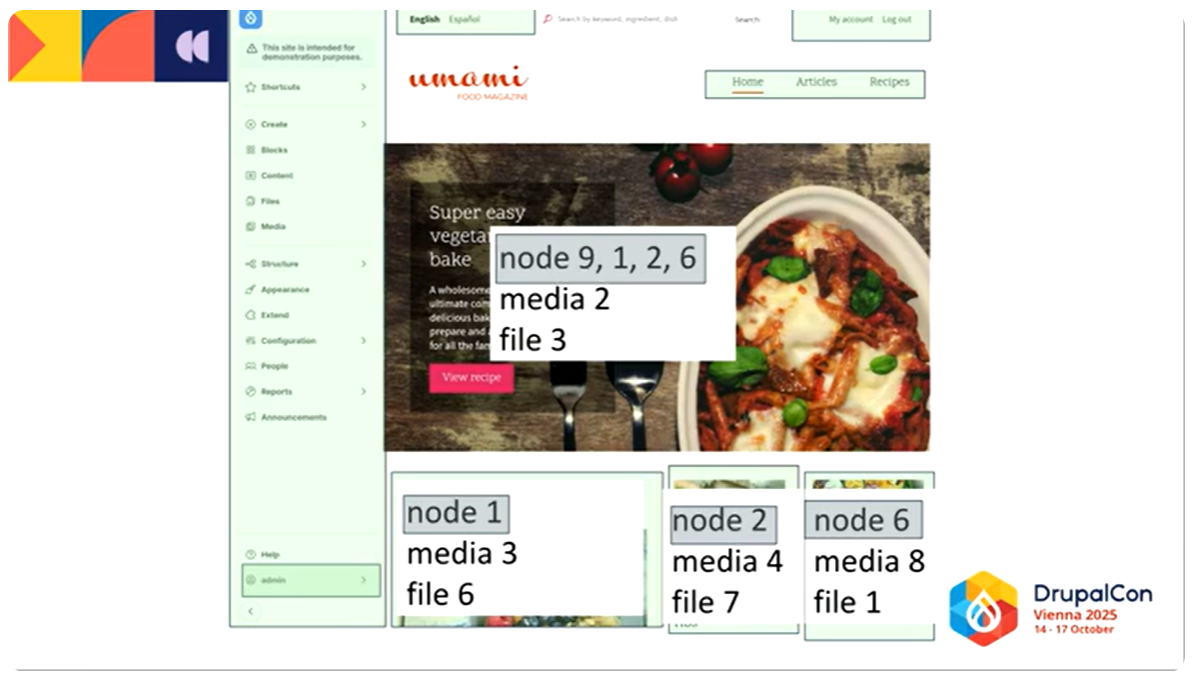
Nathaniel Catchpole (Catch), one of Drupal’s most active core committers and a long‑time leader in performance work, commented on this at his DrupalCon Vienna 2025 session. He mentioned that each placeholder runs inside a Fiber, so Drupal can suspend one, move to the next, and then finish them together.
In Nathaniel’s example, Drupal needed to fetch node 9, node 1, node 2, and node 6. On a cold cache, that could mean 10 queries per entity field — hundreds of queries in total. With Fibers, Drupal collects all the entities it needs and loads them in one batch, turning 4 separate entity loads into 1 grouped load. The same principle applies to media and file entities: instead of 12 separate lookups, Fibers reduces it to 3 grouped lookups.
Data-driven refinements
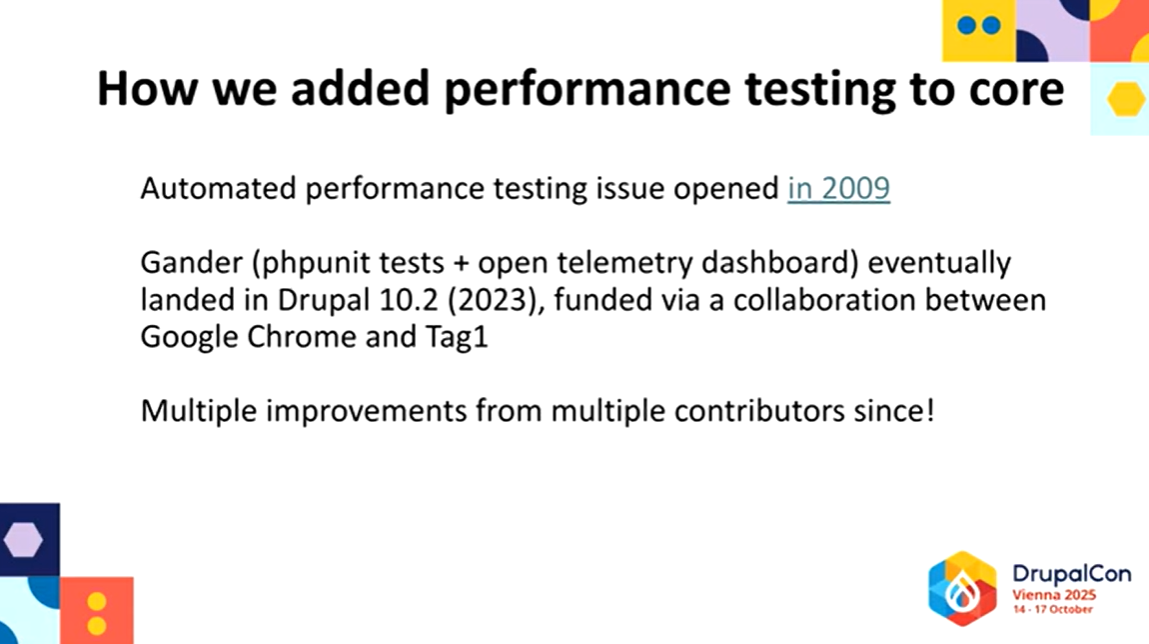
Insights from Gander, Drupal’s automated performance testing framework, led to optimizations in hook execution and field discovery in Drupal 11.3. These refinements reduce unnecessary database access during the early stages of a request, making cold‑cache scenarios noticeably lighter.
Gander was introduced to Drupal core by Nathaniel. At his DrupalCon Vienna session, he highlighted the importance of automated testing and explained how Gander’s integration into core has made it possible to identify and fix performance bottlenecks systematically.
BigPipe, now lighter with HTMX
The earlier-mentioned BigPipe tool has been rebuilt using HTMX. It’s a modern and lightweight library, designed to stream and replace the placeholders when rendering the page. Previously, BigPipe relied on Drupal’s outdated AJAX framework, which added a fairly heavy JavaScript payload.
By adopting HTMX, Drupal reduced the JavaScript required for interactions between the browser and the server, including BigPipe’s streaming, by up to 71%.
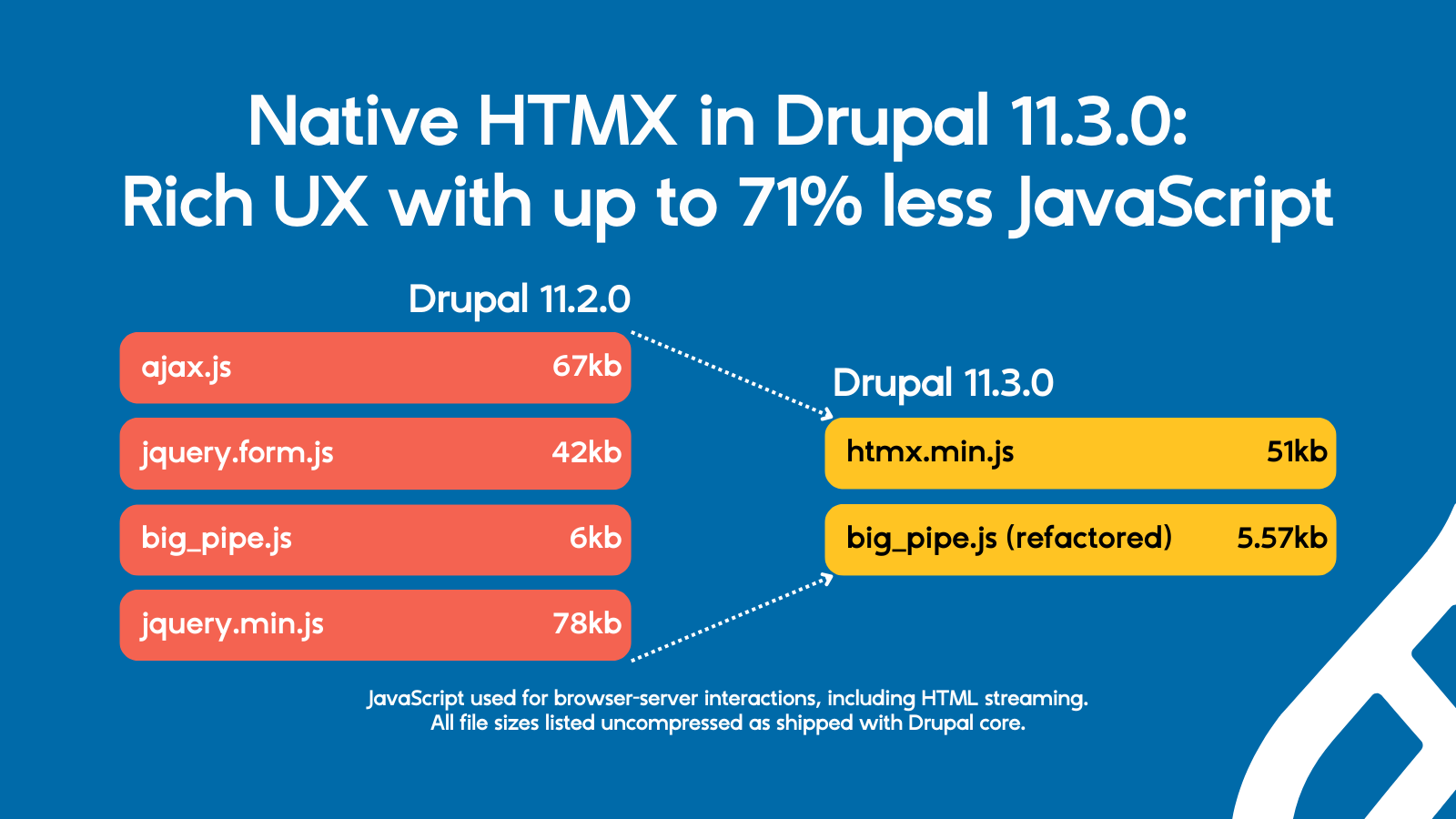
Nathaniel mentioned in his session that with the old AJAX‑based BigPipe, each page had to load about 150 KB of JavaScript, but with HTMX, the same work only needs 15-20 KB.
Before BigPipe starts replacing placeholders on a page, Drupal now checks whether those parts are ready in the render cache. If they are, Drupal simply includes them in the initial response, and BigPipe’s JavaScript isn’t loaded at all. In practice, this means BigPipe only activates when it’s truly needed. Simple requests stay lightweight, while more dynamic pages still benefit from progressive loading.
By replacing Drupal’s older JavaScript implementation with HTMX, the front end becomes faster and less complex, while still supporting rich, reactive interfaces. These improvements may also pave the way for enabling BigPipe for anonymous visitors in future releases.
The key performance gains
Drupal 11.3 dramatically reduces the “hidden work” behind each page request. Drupal core automated performance tests result show significant gains:
- Cold cache requests use roughly one-third fewer database queries and cache operations.
- Partially warmed caches, often responsible for the slowest real-world responses, see nearly 50% fewer database queries.
Independent testing on complex sites (including heavy Paragraphs usage) showed over 60% reductions in total query counts.
For medium and large sites, where the database is often the hardest component to scale, these improvements lower the baseline cost of each request and reduce pressure where it matters most.
Stats in more detail: how much faster is Drupal 11.3?
The performance tests comparing 11.2 and 11.3 were performed on a demo site built on Drupal’s Umami, a fictional food magazine used as a demonstration installation profile for the Drupal:
Cold cache improvements (first page load, nothing stored yet)
- SQL queries reduced from 381 to 263 (31% fewer). Less strain on the database, so first visits load faster.
- Cache get count (how many times Drupal tried to read from cache) reduced from 471 to 316 (33% fewer). More efficient reuse of stored data, cutting overhead.
- Cache set count (how many times Drupal tried to read from cache) reduced from 467 to 315 (33% fewer). Less repeated work, saving memory and processing time.
- Cache tag lookup query count (how often cache tags required a database lookup) reduced from 49 to 27 (45% fewer). Smarter invalidation, fewer wasted refreshes.
- Estimated request time dropped from 1368 ms to 921 ms (33% faster). Pages feel noticeably snappier on cold loads.
Partially warmed cache improvements (common scenario on real sites)
- SQL queries reduced from 171 to 91 (47% fewer). Nearly half the database work was eliminated, speeding up repeat visits.
- Cache get count reduced from 202 to 168 (17% fewer). More efficient reuse of cached content.
- Cache set count stayed about the same (41 > 42). No major change here, but still balanced.
- Cache tag lookup query count remained unchanged (22 > 22). Stable, with no added overhead.
- Estimated request time dropped from 436 ms to 323 ms (26% faster). Faster responses for frequently visited pages.
Putting it in everyday terms
Imagine you’re at a busy supermarket checkout. In Drupal 11.2, the cashier had to scan every item one by one, check coupons separately, and bag everything slowly. With Drupal 11.3, the cashier scans items in groups, skips unnecessary checks, and bags more efficiently.
As a result, the line moves faster, you spend less time waiting, and the store itself runs more smoothly. That’s essentially what Drupal 11.3 does for websites: it cuts down the behind‑the‑scenes work so pages reach visitors quicker, even when the site is under heavy load.
Final thoughts
The latest improvements show how much can be gained when Drupal evolves to use modern PHP features and smarter rendering strategies. Will your website be ahead of the pack and benefit from the biggest performance leap in a decade? The answer lies in moving to the latest version of Drupal, with trusted Drupal partners ready to make this transition seamless.