
Getting to the Drupal Core: Our Team’s Latest Contributions

As an open-source platform, Drupal thrives on contributions. Everyone adds their effort to the larger picture, helping Drupal evolve piece by piece and making it more modern, more user-friendly, and more powerful every day. All contributions matter, from small fixes to major revamps.
Our Drupal development team is actively involved in this contribution work, and we’re proud to support it. Among the many ways we contribute, one of the most impactful is our work on Drupal core — the “heart” of Drupal, which includes the essential modules, themes, and configuration that every site starts with.
In this article, we’d like to highlight our team’s latest commits to Drupal core and the role they play in strengthening the platform’s foundation. These contributions span key areas of Drupal core, including improvements to Drupal Recipes, content authoring experience, developer tooling, and overall system performance and maintainability.
Improvements in the work of Drupal Recipes
The Drupal Recipes system is an innovative solution that has been making a huge impact lately. They are essentially pre-packaged feature kits that combine sets of modules and pre-configured settings to help you instantly set up Drupal functionalities (blog, events, SEO, AI, and so on). Our team is happy to support improvements in Drupal Recipes.
1. Making Recipes work more smoothly with Composer updates
Adopting Recipes is a major milestone for Drupal, just like the earlier switch to Composer, the dependency manager tool used to safely install and update modules, themes, and code packages on modern Drupal websites. Making two game-changing tools work together sometimes requires a bit of fine-tuning for a seamless duo.
That being said, let’s start with the fix that improved how Composer handles Recipe dependencies. Great job by Bryan Sharpe of our team, who was among the contributors to the enhancement.
Previously, applying a recipe to a Drupal project could block the updates of individual contributed modules. That’s because Composer was adhering to the version constraints of that specific recipe. For example, if a recipe required a tool like the Pathauto module, its internal code rules could permanently restrict the module from ever upgrading to a newer major version.
To fix this, the “unpacking” mechanism has been introduced. Now, the moment a recipe is applied, its required packages are instantly transferred directly to the project’s main composer.json file. By treating these modules as standard project requirements rather than rigid recipe constraints, Composer can handle future updates smoothly.
2. Fixing a crash when applying Drupal Recipes with multi-item configurations
Another enhancement for Drupal Recipes and another high five to Bryan, who was a major contributor to it. This fixed an error that could occur when applying Drupal Recipes that created or updated multiple configuration items at once.
When you apply a recipe, Drupal often needs to swap out temporary text placeholders (known in programming as strings) with actual live values, like inserting your specific site name or a unique ID into the recipe’s text fields. However, Drupal configuration files do not always contain text: they can also contain non-text settings, like numbers (for sorting weights) and true/false toggles (for feature switches).
The bug occurred because the recipe system was applying this text-replacement process to every piece of data it encountered. When the system hit an integer or a boolean value instead of text, it triggered a fatal system error (TypeError) and crashed the setup process.
The fix adds a smart type-check to ensure that placeholder text replacement is only performed on actual string keys and values. By safely skipping non-string data types like raw numbers or booleans, complex recipes can now be deployed reliably, without unexpected system crashes.
3. Improving Drupal Recipes compatibility with Composer merge plugins
Next up is the solution that addressed a compatibility problem between Drupal Recipes and complex website setups using a popular developer tool called the ‘wikimedia/composer-merge-plugin.’ It allows Composer configuration to be split across multiple files instead of keeping everything in a single composer.json file.
The issue appeared during the Recipe “unpack” process, where Drupal moves a recipe’s dependencies into the project’s main composer.json. As part of this process, Drupal performed a strict validation check to confirm that Composer’s active dependency list exactly matched the contents of the main configuration file.
However, projects using the merge plugin often load additional dependencies from separate Composer files behind the scenes. Even though everything was configured correctly, Drupal detected these extra merged dependencies as a mismatch and triggered an AssertionError, interrupting the process.
The fix makes this validation more flexible. Instead of demanding a perfect one-to-one match, Drupal now simply checks that all dependencies declared in the main composer.json are present, while safely ignoring additional dependencies loaded through merged Composer configurations.
This allows Recipes to work correctly in more complex Composer setups without false errors.
Native list style choices in CKEditor 5
Next up is a major user experience update that introduces intuitive, code-free formatting options for advanced types of lists within Drupal’s rich-text editor (CKEditor 5). Kudos go to our team’s Joao Paulo Constantino for contributing to this change.
Previously, Drupal’s integration with CKEditor 5 did not expose the editor’s native special list-style options in the toolbar. If content editors wanted to use alternative list styles, such as Roman numerals (I, II, III), alphabetical lists (A, B, C), or square bullet points, they often had to switch to “Source Editing” mode and manually modify the HTML markup.
This update brings CKEditor 5’s built-in list-style controls directly into Drupal’s editor toolbar, allowing content creators to change list styles visually with a click. Behind the scenes, the improvement also simplifies Drupal’s integration by relying more directly on CKEditor 5’s native functionality.
Improving how Drupal processes form access logic
Another improvement addressed the internal structure of Drupal’s Form API. This tool is responsible for building and processing forms throughout the system (for example, content editing forms, settings pages, and configuration screens).
When a form is displayed in Drupal, the system goes through several internal steps to prepare each field. One of these steps determines whether a specific field should be visible or available to the user, depending on conditions such as configuration or access rules.
Previously, this logic was embedded inside a larger and more complex processing flow. It was harder to isolate, understand, or reuse on its own.
The change extracts this behavior into a dedicated method. This makes the structure of the form processing system clearer and more organized, with responsibilities split into more focused parts. It also makes the code easier to maintain and extend in the future. We are happy that this improvement was made with a contribution from our team’s Igor Goncalves.
Splitting oversized cache debug headers to prevent blank pages and server errors
The next update addressed a long-standing issue where enabling Drupal’s cache debugging tools could cause blank pages or server errors on complex websites.
During development, site builders can enable cacheability debugging to inspect how pages are being cached. On highly complex pages with many interconnected elements, the amount of cacheability metadata could become very large. This sometimes caused HTTP response headers to exceed typical web server limits (for example, Apache’s approximately 8-KB header size limit), resulting in failed requests and blank pages without useful error messages.
The fix automatically splits cache debug headers into multiple HTTP headers when they exceed the 8 KB limit, preventing oversized responses that could break the page. This keeps responses within safe limits, prevents server errors, and still allows developers to inspect the full debugging data. Great work by Bryan as a contributor to this improvement.
Fixing access to the admin menu block page
The next contribution improved how Drupal handles access checks for administration menu links. The admin menu is built from structured links, and some of these links define their destination using a ‘url’ attribute.
In certain cases, these links were not being correctly handled by Drupal’s access-checking system. As a result, some valid menu items could incorrectly lead to “Access denied” errors even when the user should have permission to view them.
The fix ensures that menu links defined with a ‘url’ attribute are properly processed during access checking. This makes the visibility of administration menu items more reliable and consistent with user permissions. Excellent work by Halison Fernandes, who was the main contributor to this enhancement, and Joao, who also assisted with the fix.
Smoother content translations with long usernames
Another fix in Drupal core improved the experience of working with multilingual content, a fixed supported by Igor.
Previously, translating content in Drupal could unexpectedly fail if the original content author had a long username. This was caused by an incorrect character limit applied to the “Authored by” field in the translation form.
In some cases, the form enforced a stricter limit than the standard system allows. When a username exceeded this artificially reduced limit, validation failed, and the translation could not be saved.
The update removes this unnecessary restriction from the translation interface, bringing it in line with the normal behaviour of the system. As a result, content can now be translated and saved reliably, regardless of the length of the author’s username.
Fixing dropdown arrow behaviour in the Olivero theme
Another clean-up update resolves a visual consistency bug within Olivero, Drupal’s default frontend theme. Kudos to Igor for being among the contributors who resolved this interface issue.
The Olivero theme is highly praised for accessibility, clean design, readability, and other features. Many users prefer to use it as their administration theme as well, getting a single, seamlessly unified design across the entire site.
There was an issue related to the dropdown indicator (the arrow icon). It did not visually reflect the open/closed state correctly. Users could see the same arrow direction even when the selection was expanded and collapsed. This meant that users did not always get a clear visual cue about the dropdown state, which could make the interface feel inconsistent or confusing.
The problem was caused by a CSS rule that was not being applied correctly in the expanded state. With the placement of the rule adjusted, the dropdown now correctly updates its arrow direction. This provides clearer visual feedback and a more consistent user experience.
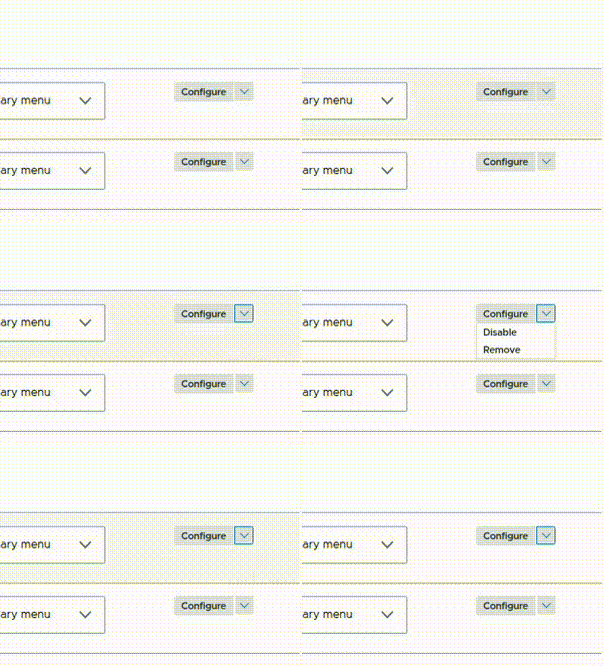
Before
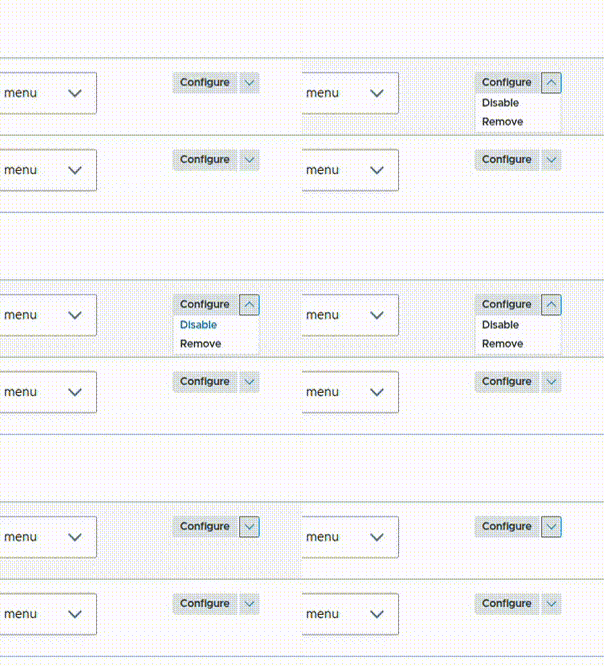
After
Sharpening developer docs for draggable lists
The next contribution improved the documentation for Drupal’s DraggableListBuilder, a class used to build drag-and-drop interfaces for configuration entity listings in the administration UI.
The issue was that an important requirement was not clearly documented: entities using this system must define a weight key in their ‘entity_keys’ definition. This value is used to determine the ordering of items in the list. Without it, developers could extend DraggableListBuilder and expect drag-and-drop sorting to work, but the ordering would not function correctly.
The change adds clearer class-level documentation explaining how DraggableListBuilder works and what configuration it requires. This helps developers set up draggable admin lists correctly and avoid subtle configuration issues.
Removing unused legacy code from Drupal’s AJAX renderer
The next enhancement cleaned up Drupal’s internal rendering code by removing leftover, unused logic. It includes an input again, from Igor.
The update targets the system that handles AJAX — the technology responsible for updating parts of a web page dynamically behind the scenes without forcing the user to reload the entire screen (such as submitting a form or opening a pop-up modal instantly).
In the ‘AjaxRenderer’ class, there was still a conditional check for a response type related to “ajax.” However, the supporting code it depended on had already been removed in a previous change. As a result, this condition was no longer reachable in practice and effectively became dead code.
The fix removes this outdated block entirely. This improves code clarity and maintainability by cleaning up legacy logic that is no longer used in Drupal core.
Final thoughts
Each commit helps ensure Drupal remains a platform people can trust and build upon, or discover with fresh excitement as they see how quickly it evolves. We’re proud to play our part in that ongoing work, and we look forward to continuing to support Drupal’s growth with steady, thoughtful contributions.