
Why Drupal for Higher Education: The CMS Built for Universities
- What Makes Higher Education Websites Different From Other Industries
- Why Drupal Is the Best CMS for Higher Education
- How Drupal Handles Higher Education's Biggest Web Content Management Challenges
- Future-Proofing Your Institution With Drupal
- Choosing the Right Higher Education Web Content Management System
- Real Results From Universities Using Drupal
- Finding the Right Partner for Your Higher Education Website Strategy
Run a digital audit on a university and you'll find something closer to a city than a business. You have a marketing site for prospective students, an intranet for staff, a portal for current students, and a donation platform for alumni.
Most industries don't handle this level of complexity. A standard corporate site usually has one main goal, like selling a product. A higher education site has to guide a teenager through the application process while helping a researcher publish findings and a donor fund a scholarship.
Your website functions as essential infrastructure. When navigation breaks, the institution stops working.
Choosing the right CMS comes down to solving this specific problem. You need a platform strong enough to handle thousands of pages but flexible enough to let the art department look different from the engineering school.
What Makes Higher Education Websites Different From Other Industries
Universities operate like massive, decentralized organizations. You have hundreds of departments that act like independent companies, yet they all need to exist under one brand. There are strict rules for accessibility and privacy that don't apply to most businesses. Corporations might change direction every quarter. A university needs infrastructure that stays stable for decades.
Generic CMS platforms fail here because they’re built for one thing. They handle blogging well, or they handle e-commerce well. They rarely handle the intricate web of permissions and integration that a university demands.
You're Managing Multiple Audiences With Competing Needs
Your website serves groups of people who want completely different things:
- Prospective students want to know what campus life feels like.
- Current students need to find the library hours.
- Faculty need a place to post research.
- Alumni want to donate.
Marketing teams often try to solve this by building separate sites, but this can create a messy experience. A prospective student lands on a beautiful admissions page, clicks a link, and suddenly ends up on a department page that hasn't been updated since 2018.
You need a system that presents different faces to different users without breaking the site. The architecture must allow a high school senior to see a vibrant, mobile-first experience while letting a professor access a text-heavy archive on the same domain.
Your Content Spans Every Department, Program, and Initiative
The volume of content in higher education is huge. A mid-sized university might have tens of thousands of pages spread across hundreds of subdomains.
The volume isn't the main challenge, it’s ownership. The central marketing team can't write every page, so the work gets delegated. But if you give total freedom to the physics department, they might design a page that ignores your brand guidelines.
This creates the central tension of higher education web management:
- You need to give people the tools to manage their own content without giving them the keys to break the system.
- You need governance that enforces standards automatically so you don't have to police every single edit manually.
Why Drupal Is the Best CMS for Higher Education
Did you know 71% of the top 100 universities run on Drupal?
Drupal prioritizes scale. It assumes you're building something complex, like a university website, and gives you the tools to handle it.
Enterprise-Level Security Is Built In
Universities are prime targets for cyberattacks. You hold everything from student financial records to valuable research data, and a breach here is a legal, ethical, and PR problem.
The platform has a dedicated security team that reviews code and issues patches before vulnerabilities can be exploited widely. Because the code is open source, thousands of developers inspect it constantly. Bugs get found and fixed faster than they do in proprietary software where only a handful of internal engineers ever see the code.
This security extends to how you manage your team. Most CMS platforms have binary or limited permission settings. Drupal lets you get specific, you can let a student worker edit the text on the cafeteria menu page without giving them the ability to delete the entire site or access donor data.
You Can Manage Hundreds of Sites From One Platform
The biggest logistical headache for university IT is the sprawl of microsites. Every research lab, student club, and summer program wants its own website.
If you build these on separate installations of WordPress, you end up maintaining hundreds of different codebases, which is a maintenance challenge.
Drupal solves this with its multisite architecture. You can run hundreds of different websites off a single codebase.
Standard CMS Approach | Drupal Multisite Approach |
Updates: You must update 100 sites individually. | Updates: You update the core once, and all 100 sites are secure. |
Branding: Every site looks different and breaks brand rules. | Branding: You push a global theme update that fixes the logo on every site instantly. |
Cost: You pay hosting or licensing fees for every domain. | Cost: You pay for one robust hosting environment that serves everyone. |
You Own Your Code Instead of Renting It
Proprietary web content management solutions for higher education often come with steep annual licensing fees and vendor lock-in. If the vendor stops supporting a feature you need, you're stuck. If they raise prices, you have to pay or rebuild everything.
Drupal eliminates licensing fees entirely. You own your data and your code. And you can host it anywhere you want and modify it however you need.
This openness prevents the "black box" problem. When you need a specific integration for your student information system or your course catalog, you don't have to wait for a vendor roadmap to catch up with you. You can build it yourself or download a module that the community has already created.
How Drupal Handles Higher Education's Biggest Web Content Management Challenges
Theory is fine, but you need to know how this works in practice. Higher education IT and marketing teams face a specific set of headaches every day.
Here’s how the platform solves the problems you actually have.
Connecting to Student Systems and Meeting Accessibility Requirements
Your website cannot be an island. It has to talk to your Student Information Systems (SIS), your Learning Management Systems (LMS), and your CRM.
Drupal is API-first, meaning it connects to other software by default. You can pull course data directly from the registrar's database and display it on the website. If a class fills up in the database, the website updates automatically. You don't need a staff member to manually change the text.
This connectivity extends to legal compliance.
Drupal builds accessibility into the core code. It forces content creators to add alt text to images and ensures forms are readable by screen readers.
With WCAG 2.1 Level AA compliance deadlines approaching in April 2026 for larger institutions and April 2027 for smaller ones, accessibility can't be an afterthought.
Empowering Non-Technical Staff to Manage Their Own Content
One of the biggest bottlenecks in higher education marketing is the "IT request." If a professor needs to update a bio or a department head wants to post a new policy, they shouldn't have to email a developer.
Drupal provides an intuitive editing interface that looks a lot like a standard word processor. You give your team permissions based on their role. You can set granular permissions where contributors draft, editors publish, and admins manage layouts.
You can lock down the brand colors and font choices so no one can mess them up, while still letting departments manage their own text and images.
The physics department gets to control their content, and the marketing director gets to sleep at night knowing the brand is safe.
Future-Proofing Your Institution With Drupal
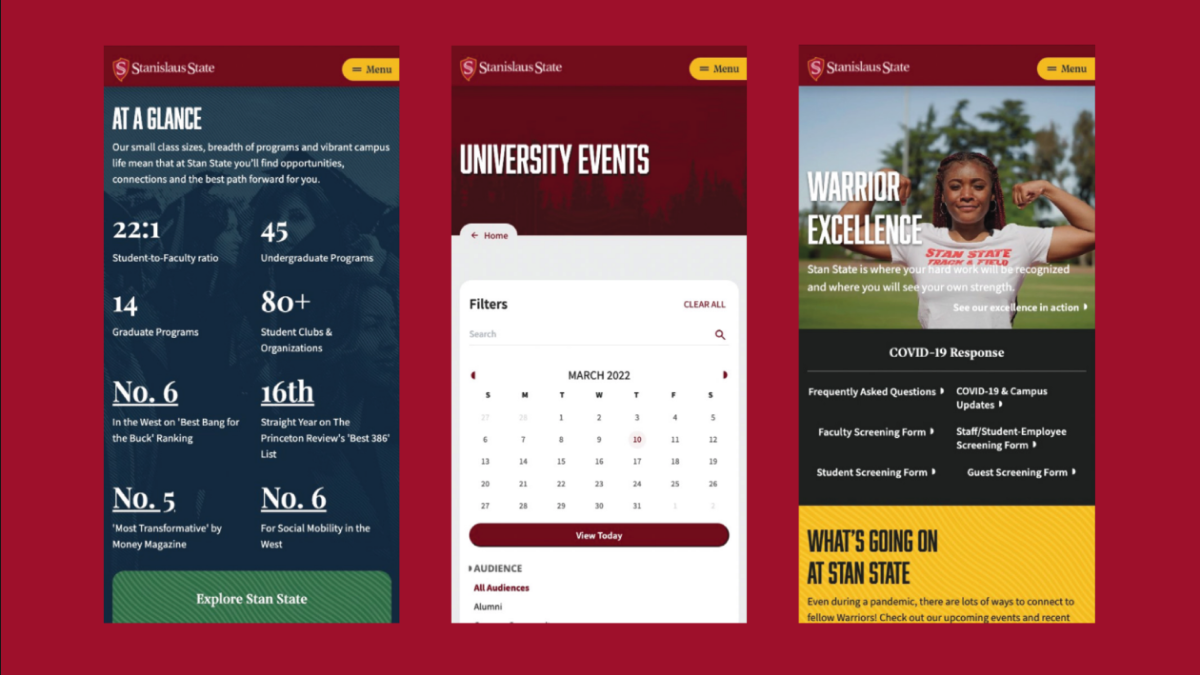
Technology moves faster than university budget cycles. A platform launched today cannot look obsolete in two years. With expectations shifting from static brochures to AI-driven answers, your infrastructure must adapt to how students find information.
95% of college students own smartphones and expect instant access to course information, registration systems, and campus resources.
If a site loads slowly or breaks on a phone, it doesn’t leave a great impression.
And speed is only half the battle, search queries now include AI-driven answers. Platforms like ChatGPT and Google's AI Overviews rely on structured data to answer user questions.
Drupal structures content logically on the backend so these AI tools can read and rank your institution effectively.
This technical foundation supports other critical functions:
- Personalization: The site can show application deadlines to high school seniors while showing research grants to faculty members.
- Compliance: The platform updates its code to meet new standards automatically, keeping you ahead of accessibility lawsuits.
Best of all, you aren't betting your future on a single vendor's financial health. You get a global community of higher education developers who share innovations and fix problems the moment they appear.
Choosing the Right Higher Education Web Content Management System
Selecting a platform is a long-term commitment, so you need to determine if the platform's power justifies its complexity for your specific situation.
This is a framework to help you decide if Drupal fits your institutional needs.
Drupal Makes Sense When... | It May Not Be the Best Fit For You If... | You'll Get the Most Value When... |
You manage 10+ departmental sites or micro sites. | You run a single, static website with no subdomains. | You are planning for a 5+ year horizon and need stability. |
You need to pull data automatically from SIS, CRM, or LMS platforms. | You don't need to connect to any internal databases. | You have access to technical expertise (in-house or agency). |
You have decentralized content teams but need central governance. | You have a small marketing team that manages everything centrally. | You need the flexibility to build custom academic features. |
You face strict legal requirements for accessibility compliance. | You prioritize drag-and-drop simplicity over scalability. | You want to own your code and avoid vendor lock-in. |
Real Results From Universities Using Drupal
Talking about features is useful, but seeing the results is better. You need to know if this investment moves the needle on recruitment and operational efficiency.
Here’s what happens when institutions switch to a platform built for their specific needs.
Ashland University: Finding More Students
Ashland faced a common problem. Their content was trapped in silos, making it hard for prospective students to find what they needed. The navigation confused users, and the site didn't work well on phones where students browse.
We helped them migrate to a modern Drupal architecture with a story-first approach. The impact on their recruitment funnel was immediate.
- 230% increase in organic search traffic. Students started finding the university naturally because the site structure finally made sense to search engines.
- 282% jump in referral traffic. Better content meant more people shared it and linked to it.
- Mobile-first engagement. The redesign met students on their devices, removing friction from the application process.
Read the full Ashland University case study
University of Waterloo: Managing Scale Efficiently
The University of Waterloo manages a massive digital ecosystem. They have 1,100 websites serving 7 million page views every month.
Managing this volume on a standard platform would be a nightmare. Using Drupal's multi-site capabilities, they handle it with a lean team. They built reusable components that work across all departments.
For example, when they needed a student expense calculator, they didn't build a one-off tool. They built it as a flexible component that any department could use. They even contributed two modules back to the Drupal community so other universities could solve the same problem.
This proves you can serve diverse needs while maintaining strict consistency.
Read the full University of Waterloo case study

Finding the Right Partner for Your Higher Education Website Strategy
Selecting the right CMS is only the first decision. The next one determines if that technology solves your problems or creates new ones.
Strategy, implementation, and ongoing support matter as much as the code itself. Even the best platform fails if the architecture doesn't match your internal workflows or if the design ignores your enrollment goals.
We specialize in guiding universities through this complexity, not simply building the site and walking away. We help you design the governance models and content strategies that keep the site healthy for years.
If you're ready to discuss your institution's digital future, let’s chat.