How to Tell Whether You Have an AI-Ready CMS Before You Modernize

- What Is an AI-Ready CMS?
- AI CMS Features Versus Architecture That Lets AI Use Your Content
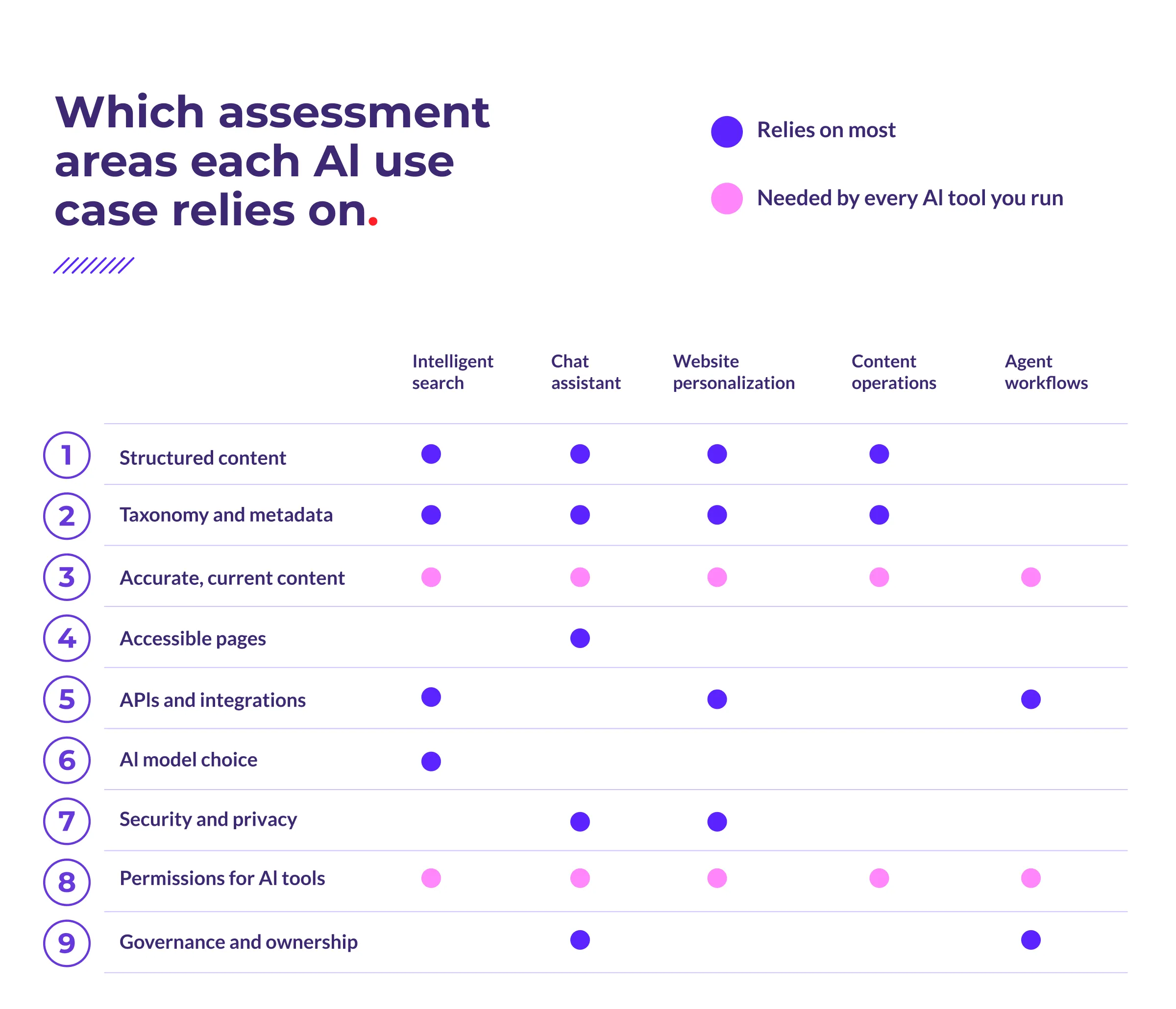
- What Each AI Use Case Needs From Your Content and Platform
- How to Run an AI Readiness Assessment on Your Current CMS
- Do You Need to Replatform Your CMS for AI?
- Questions to Add to Your Next CMS Modernization Scorecard
- Where to Start Your AI Strategy
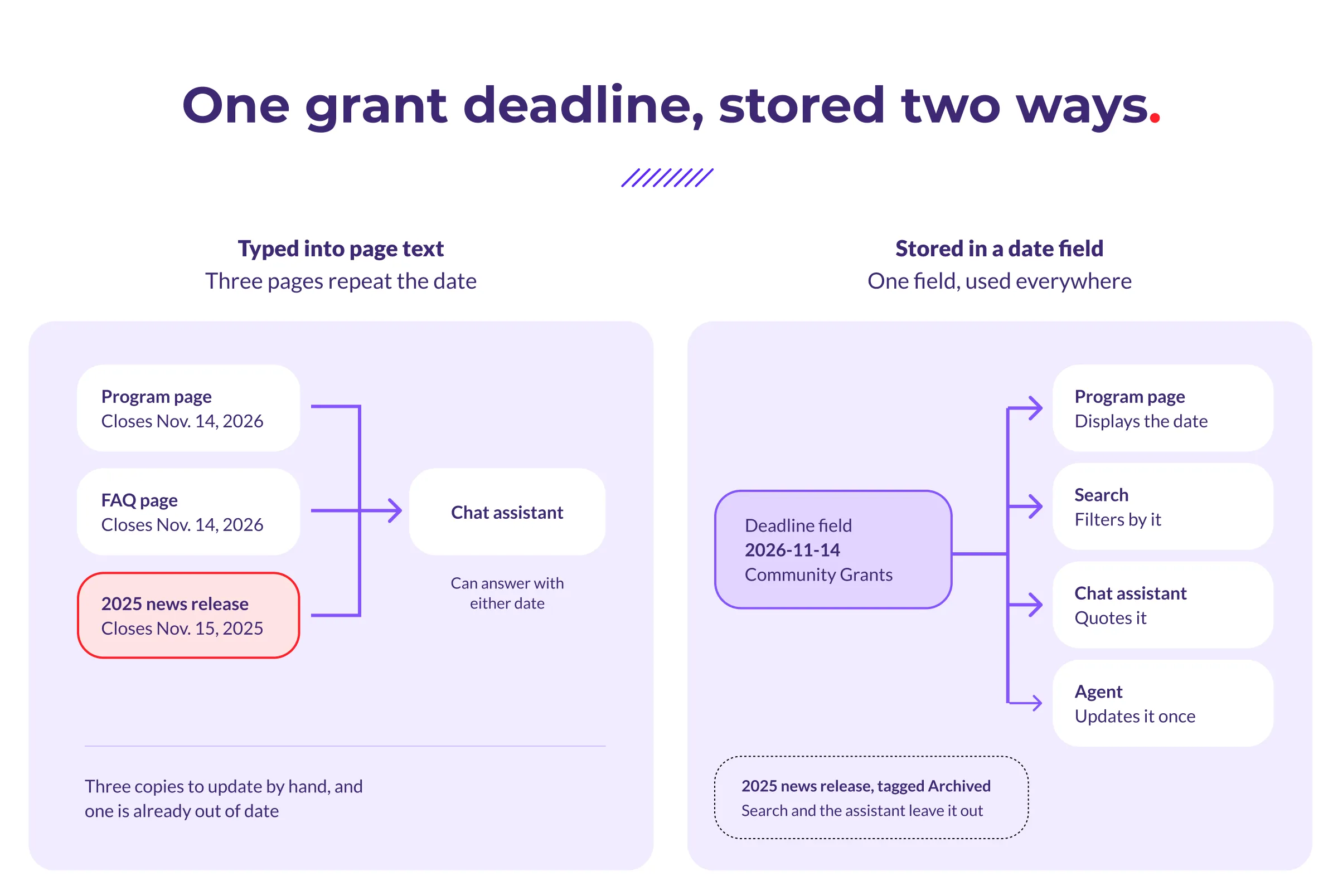
When a visitor asks the AI assistant on your website when a grant program closes, the assistant builds its answer from the pages your content management system (CMS) publishes. If this year's program page lists the new deadline and an older page still lists last year's, the assistant can give either date, and the visitor has no way to tell which one is right. Fixing that means changing how the deadline is stored, labelled, and updated in your CMS, and how your team approves changes to it.
If your organization is writing an AI strategy while it plans a CMS upgrade or replacement, the two plans depend on each other. When you choose a platform only for how you publish today, you can miss what AI tools require from it. Some of those requirements, like storing a deadline in a date field, are hard to change after launch. So before you add AI features, ask whether the content in your CMS is accurate and well organized, and whether your team controls what AI tools can access and change.
This guide is for teams responsible for websites in higher education, nonprofits, government, healthcare, and B2B organizations. Whether you’re helping students find admissions information, connecting people with public services, or making it easier for buyers to find product answers, it will help you assess whether your current CMS can support your AI plans, what to improve first, and when it makes sense to consider a new platform.
An assessment of your current platform will show which problems you can fix on it and which ones call for a new platform.
What Is an AI-Ready CMS?
An AI-ready CMS stores accurate content in a structure AI tools can read, and it gives your organization control over what those tools do with that content. Whether a CMS qualifies depends on three layers:
- Content: how it's modelled, labelled, kept accurate, and marked up on the page
- Platform: how content reaches other systems, which AI providers you can connect, and what data leaves your organization when you do
- People and rules: who decides what AI tools can see and change, who reviews what they produce, and who owns each content type and AI integration
A CMS can meet all three without any AI features of its own. An AI-ready website depends on the same layers, because AI tools answering questions about your organization read the pages your CMS publishes.
AI CMS Features Versus Architecture That Lets AI Use Your Content
If you search for "AI CMS" or "AI content management," you'll find vendor pages that list features inside the editing screen, like a writing assistant, suggested tags, alt text suggestions, and one-click translation. Those features can save editors time on routine tasks.
A second group of AI tools works with your content from outside the editing screen:
- Site search that matches a question to pages by meaning
- Chat assistants that answer visitors in full sentences
- External answer engines, like ChatGPT and Google's AI Overviews, that summarize your public pages
- AI agents that read and update content across your CMS, customer relationship management (CRM) system, and other software
How well these tools perform depends on architecture. That means a content model that stores information in defined fields, labels applied the same way across the site, application programming interfaces (APIs) that deliver content to other systems, and permissions that apply to software as well as to people.
What Each AI Use Case Needs From Your Content and Platform
Every AI use case below depends on accurate content since AI tools repeat what they retrieve. The tools you use also need permissions that limit each one to what the person using it is allowed to see.
Intelligent Search on Your Website
Intelligent search or semantic search matches a visitor's question to pages by meaning, so someone who types "when do applications close" can find the grant deadline even if the page never uses the word "close." Results improve when search can filter on consistent tags, like program or region, and when facts like the deadline are stored in separate fields, so the date can appear in the search result itself.
Conversational Search and AI Answer Engines
A chat assistant that answers from your website works through retrieval-augmented generation (RAG). It finds the passages in your pages that match the question, then writes an answer from those passages.
GOV.UK Chat is the UK government's RAG assistant in the GOV.UK app, they say an LLM "can only generate accurate answers if it is given the right information to work with." Before retrieval, the team filters GOV.UK content by metadata to favour current guidance and to exclude pages that contain personal information. It also splits each page into sections "while preserving the HTML header structure," which depends on pages built with proper headings.
External answer engines like ChatGPT do something similar with your public pages. What they say about you depends on how accurate those pages are. An on-site assistant also requires design decisions that a search box doesn't, like how it cites its sources and how a visitor reaches a person.
Website Personalization
On a B2B site, personalization might show a returning buyer the documentation for the product line they've been reading. That means you need audience and topic metadata on each piece of content, components that can be recombined on a page, a connection to the CRM or customer data platform that recognizes the visitor, and consent rules for the data involved. AI-driven personalization replaces rules your team writes with software that predicts what each visitor wants, and that software uses the same audience and topic tags to find content that fits.
Content Operations Inside the CMS
AI tag suggestions stay consistent when they're limited to your controlled vocabulary, the agreed list of tags editors use. Without one, the tool suggests new tags, and one topic ends up with several names. Machine translation works better when content is divided into fields and you have a list of approved terms, such as the official French names of your programs.
Agent-Assisted Workflows Across Connected Systems
An AI agent completes multi-step tasks across systems. For the grant program, an agent could find every page that mentions last year's deadline, draft the updates, and send each one to the page's owner for approval. Some vendors call a CMS designed for this kind of task an agentic CMS.
An agent needs an API it can use to read and write content. Several CMS platforms now offer this through the Model Context Protocol (MCP), an open standard for connecting AI agents to software. For public content, we recommend that a person approve each change an agent makes before it goes live.
How to Run an AI Readiness Assessment on Your Current CMS
The assessment covers nine areas in three layers, and different people in your organization hold the evidence for each layer.
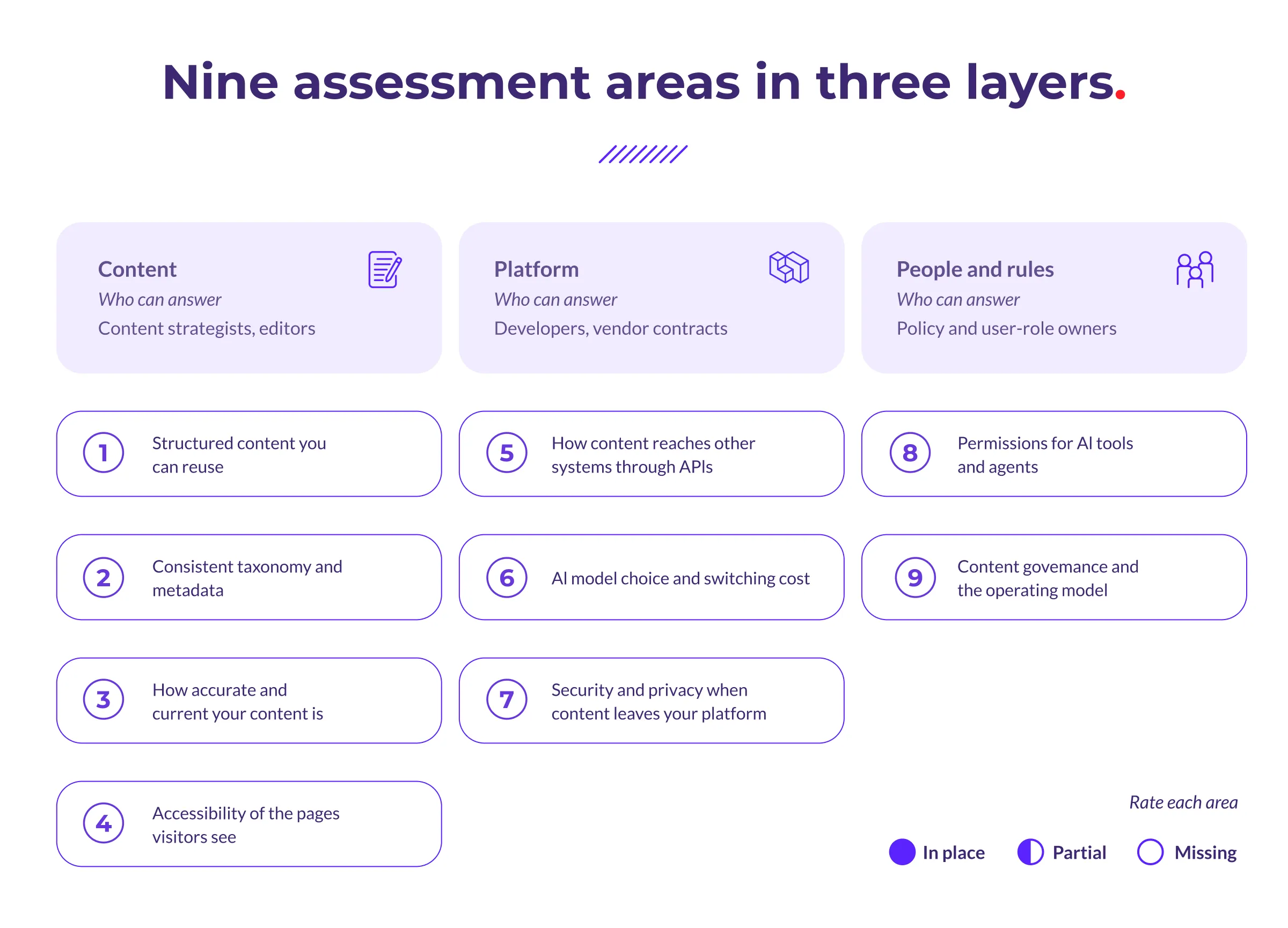
Rate each area as “in place”, “partial”, or “missing”, and base each rating on evidence someone can show you, such as a content model diagram or an export of user roles. For every area you rate partial or missing, note which AI use case it holds back.
1. Structured Content You Can Reuse
Structured content stores each piece of information in a defined field. On a program page, the grant deadline is a date field and the eligibility rules sit in a separate field, helping AI tools find the deadline without searching the body text.
Content modelling means deciding which content types you publish, like a program page, and which fields each one has. Reusable components keep repeated facts consistent, since a contact block edited once updates on every page that uses it.
To check this area, pick a fact people ask about often and find every place it appears in your CMS. If it's typed into the body text of several pages, someone has to update each copy by hand, and any copy they miss goes out of date.
2. Consistent Taxonomy and Metadata
Taxonomy and metadata record which program a deadline belongs to, who a page is for, when someone last reviewed it, and whether it's current or archived.
Search tools and assistants use these labels to filter and rank results. If the admissions office tags pages "Graduate Programs" and a faculty uses "Grad Studies," a search filtered on either label misses every page tagged with the other. To see how consistent your labels are, search your CMS for one program or product name and count the variations.
3. How Accurate and Current Your Content Is
Content is accurate when every page is correct and up to date and no two pages give different answers to the same question. In 2024, British Columbia's Civil Resolution Tribunal held Air Canada responsible after the chatbot on its website told a customer they could apply for a bereavement fare after travelling, which contradicted the airline's bereavement policy page. The tribunal rejected the airline's argument that it wasn't liable for its chatbot, writing that "it makes no difference whether the information comes from a static page or a chatbot." It also found that customers shouldn't have to check one part of a website against another.
Once an AI assistant answers from your pages, it can contradict itself, and by the tribunal's reasoning, your organization is responsible for whichever answer it gives.
To check this area, list the ten questions your contact centre or inbox receives most often, then count how many pages answer each one and whether the answers agree. Old news releases add to the problem, because an assistant can quote a release that still lists last year's deadline. To find and retire those pages, follow the audit steps we use to keep digital clutter out of a new site.
4. Accessibility of the Pages Visitors See
Accessible pages use proper headings, lists, tables with header cells, alt text on images, and transcripts for audio and video. Screen readers depend on that markup, and so do AI tools that read your pages, since both work from the structure of the HTML.
In an April 2026 rule on web accessibility, the US Department of Justice found that generative AI "does not yet reliably automate the remediation of inaccessible content at scale," so you can't count on an AI tool to fix accessibility across your site.
Start with your templates, because a fix to one template corrects every page built on it. Then look at problems editors create page by page, like missing alt text or headings chosen for their size.
5. How Content Reaches Other Systems Through APIs
Confirm that your CMS has a stable, documented API and that your integrations with systems like your search index and CRM use it. Integrations built directly into templates or database tables break more easily when either system changes. A traditional CMS with a well-documented API can deliver content to AI tools as well as a headless CMS can. If you plan to use agents, also ask whether the platform supports MCP and how mature that support is.
Then ask a developer how long it would take to send the deadline field to a new system. Plan for an integration project if the answer is more than a few weeks.
6. AI Model Choice and Switching Cost
The AI provider that suits you today may not suit you in two years because of price or where it processes data. See if the platform can connect to more than one AI provider through a single integration layer, and what it would take to switch. Ask where your prompts and embeddings are stored and whether you can export them. Embeddings are the numerical versions of your content that AI search uses, and a different embedding model means creating them again.
In Drupal, for example, the AI module connects to dozens of providers through one interface, so you can change models without rebuilding your integrations.
7. Security and Privacy When Content Leaves Your Platform
When an AI tool processes your content or a visitor's question, that data goes to whichever provider runs the model, and that provider may process it outside your country. Review which content types you send to which providers, whether any of that content includes personal information, and whether each provider's terms let it store your data or train on it.
Visitors can also type personal details into chat boxes, like a name and a file number in a question about an application, so the assistant's logs need the same protection as any other personal data. If your organization is bound by data residency rules, as some Canadian public bodies are, you can use only providers whose models run where those rules allow.
8. Permissions for AI Tools and Agents
Give each AI integration a separate account and role to limit its access and review what it did. Then confirm that:
- AI tools can't retrieve unpublished drafts or restricted pages, so next year's grant deadline doesn't reach a visitor before it's approved
- Search and chat tools return only documents the person asking can open in the source system
- A person approves each change made by AI before it goes live, and the CMS logs every action an AI tool takes
9. Content Governance and the Operating Model
Name an owner for every content type, vocabulary, and AI integration, and give owners the time and authority to act on what they find. Write an AI use policy that says which tools staff may use on which content and who approves adding a new tool. If you run a chat assistant, name someone to check its answers to the ten questions from area 3 on a set schedule.
Pick a few pages at random and ask who owns them. If nobody can say, record the area as missing.
Do You Need to Replatform Your CMS for AI?
You need a new platform only when the assessment finds limits in the architecture itself. To find out, sort each area you rated partial or missing into one of three groups:
- Content and process: inconsistent tags, contradictory pages, or pages without owners. These need editorial time and decisions.
- Configuration and implementation: missing workflow states, AI tools that share a person's login, or integrations built on the database. A developer can fix these on your current platform.
- Architecture: pages stored as single blocks of text, or AI features tied to one vendor's models. Only this group calls for CMS replatforming.
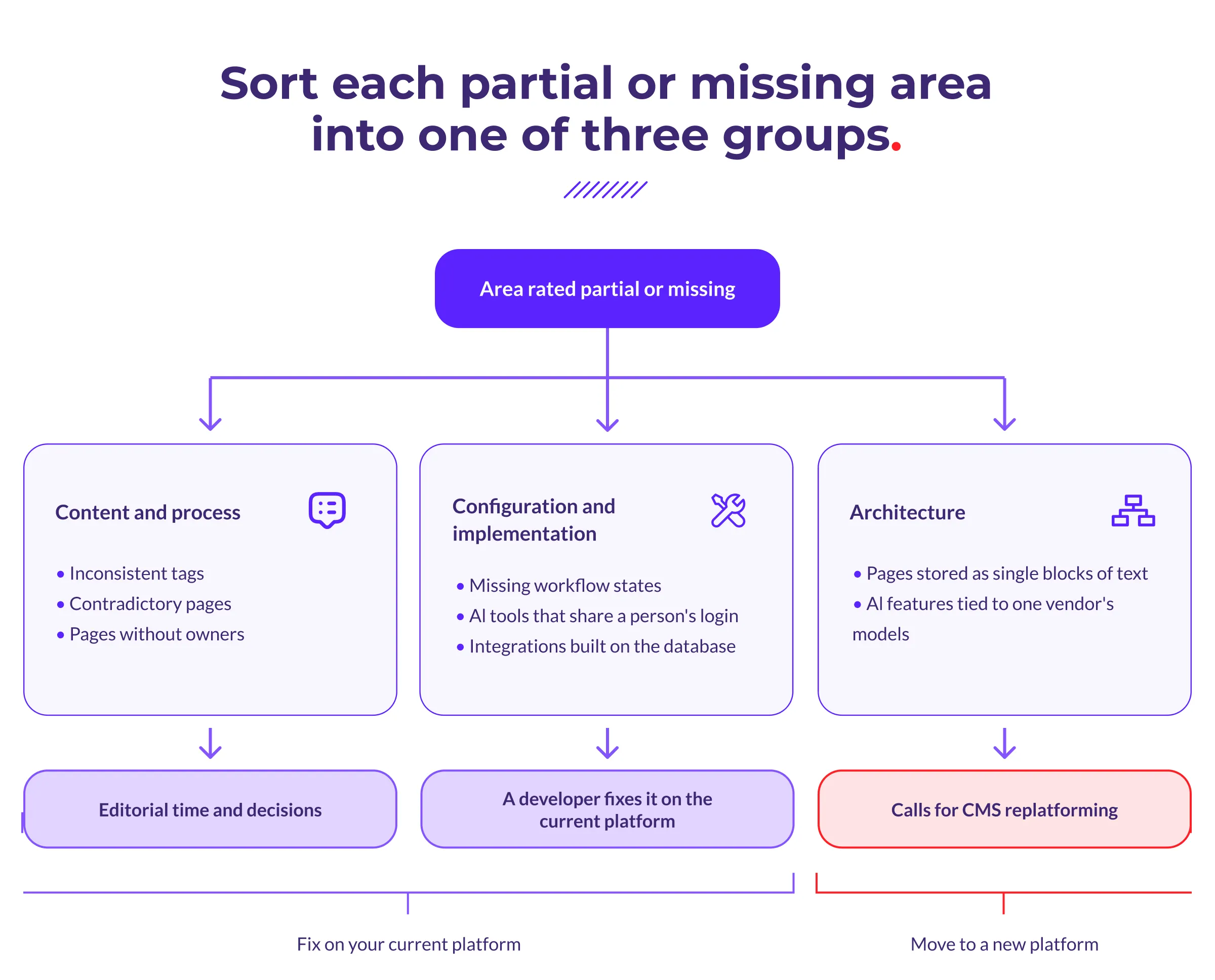
When your platform nears the end of its support, run this sort before you choose between an upgrade and a rebuild. Drupal 10, for example, reaches end of life on December 9, 2026. Our guide to technical debt covers when to keep improving a platform and when to replace it.
Findings You Can Fix Without Replatforming
If your platform is still supported and has an API, you can usually make these fixes on it:
- Move facts people ask about, like deadlines, out of body text and into their own fields
- Merge duplicate tags into one controlled vocabulary and add review dates to pages
- Correct, merge, or retire pages that contradict each other
- Update templates so headings, lists, and tables use proper HTML
- Document and version the API and move integrations onto it
- Connect AI providers through modules or configuration
- Set which content types each AI provider can receive
- Create accounts, roles, and approval steps for AI tools
- Write an AI use policy and name the owners
Governance problems belong in this group because people have to write the rules before any platform can enforce them through required fields and workflow states.
Signs Your Architecture Can't Support Your AI Plans
Look for limits like these, where the fix would mean rebuilding the platform itself:
- A content model that stores each page as one block of text, with no way to add fields
- No API, or one that can't apply permissions without changes to the platform's core
- A permission system that can't give AI tools their own restricted accounts
- AI features tied to the vendor's models, with no supported way to connect another provider
- No way to keep AI processing in the jurisdiction your data rules require
If a new platform is the answer, bring the assessment into the migration plan. Fix the pages you marked for correction before you migrate them, and leave the ones marked for retirement behind. Build the fields and labels your first AI use case needs into the new content model, and consider migrating one section at a time so you can test that use case on the first section before you move the rest.
Questions to Add to Your Next CMS Modernization Scorecard
When you evaluate a new platform or an implementation partner, add questions that an assessment of your current CMS can't answer:
- Can we export all content, taxonomy, and revision history in a documented format, and what do the exit terms say?
- Which AI features work today, and which are on the roadmap, with dates?
- Which AI providers can we connect, and can we use our own contract with a provider?
- Where does AI processing happen, and does any provider keep our prompts or content?
- Does the platform enforce governance rules, such as required fields and approval steps, or only allow them?
- How do AI agents get access to content, and how mature is that support?
- What happens to our contract and the product roadmap if the vendor is acquired?
Which parts of the assessment will the implementation partner own, and which stay with our team?
Where to Start Your AI Strategy
Before you add an AI feature, pick the use case you want to launch first and rate only the assessment areas it depends on. Fix the weakest area, then rate those areas again. An AI assistant that answers questions about grant deadlines relies most on structured content, taxonomy, accuracy, and permissions (areas 1, 2, 3, and 8), so those should come before an API project or a comparison of AI models.
We help organizations connect CMS modernization with AI readiness, working across content models, governance, integrations, and the design of AI features. When a rebuild is the right call, we build on Drupal, an open-source CMS with content types, an API, and approval workflows built into its core. If you'd like help running the assessment or sorting its results, talk to us.