What Is Web Design? A Practical Guide to UX, UI, Accessibility, and Better Digital Experiences

- What is web design?
- What does web design include? 7 core elements
- Web design vs. web development: what's the difference?
- Why is web design important?
- What makes a website well designed?
- What does the web design process look like?
- Web design for complex, multi-audience websites
- How do you know when your website needs a redesign?
- Web design FAQs
Somewhere near the start of a website redesign, the word design starts doing a lot of jobs at once. It can mean the look of a site, its structure, its behaviour on a phone, or the whole project.
Web design covers far more than appearance, and understanding its parts makes every later decision easier, from setting a budget to briefing a partner.
In this guide, we'll walk through what web design includes, how it differs from web development, what separates a well-designed site from a frustrating one, and how to tell when yours needs more than a refresh. Throughout, we'll pay particular attention to what changes when a site serves several audiences at once, as university, government, healthcare, and nonprofit websites do.
What Is Web Design?
Web design is the process of planning and shaping everything a visitor experiences on a website. It covers how content is organized, how navigation behaves, how pages look, how fast they load, and whether people of every ability can use them. Strong web design connects what users need with what your organization is trying to achieve.
The narrower, everyday meaning of the term, the visual appearance of a site, is only one piece. Appearance is incredibly important, but a website is truly successful when a resident finds the permit form or a donor completes a gift without hunting for it. In other words, when the user completes their goal.
The decisions that make those moments easy are design decisions too, even though none of them show up in a screenshot.
The more audiences a website serves, the more design complexity it carries. A definition that fits a five-page brochure site stretches a long way when thousands of pages and dozens of editors are involved, and we'll come back to that scale throughout.
What Does Web Design Include? 7 Core Elements
Web design includes seven core elements:
- User experience (UX) design
- User interface (UI) design
- Visual design
- Content structure and layout
- Accessibility
- Responsive design
- Performance
They're separate disciplines with separate skills, but visitors experience them as one thing, so weakness in any of them drags down the rest.
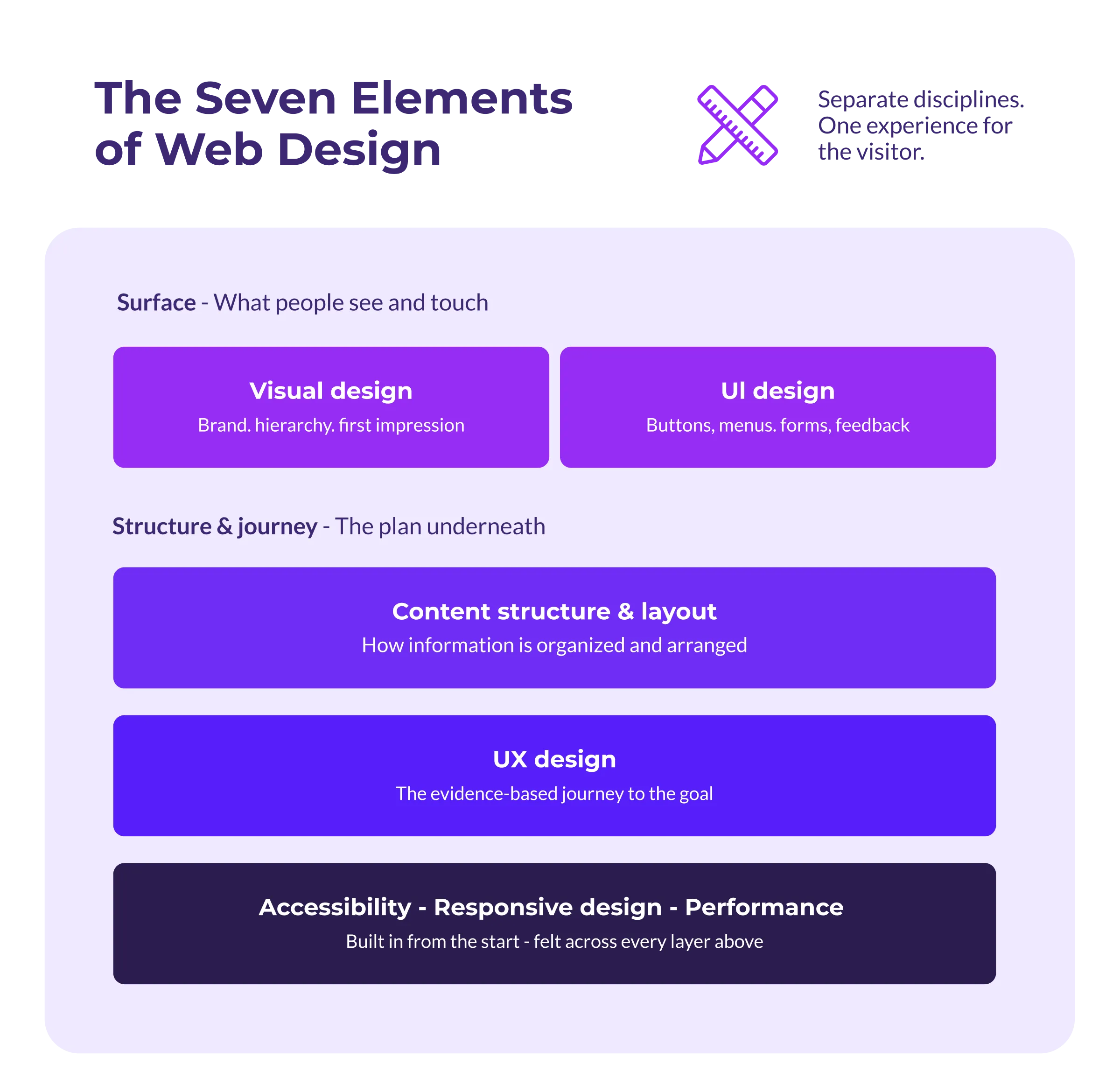
The seven elements are distinct skills, but a visitor meets them as a single site, so a weak layer pulls down the rest.
User experience (UX) design
User experience (UX) design is the practice of making a website easy to navigate and use, so visitors can find information, complete tasks, and achieve what they came to do with as little friction as possible. It starts with evidence rather than opinion. UX designers study analytics, watch people attempt tasks, and map the routes visitors take, then use what they learn to plan navigation, page flows, and search.
The results are easier to feel than to see. When requesting a demo takes one form instead of multiple emails, or a course catalogue surfaces the right program on the first search, that's UX design working.
User interface (UI) design
User interface (UI) design is the design of the elements people interact with directly, including the buttons, menus, forms, and links on every page, and the way each one responds when it's used. If UX plans the journey, UI designs every point of contact along the way.
Good interfaces are predictable. Controls look like what they do, the same action behaves the same way on every page, and each click or tap produces visible feedback, so visitors never wonder whether the site heard them.
Visual design
Visual design is the use of typography, colour, imagery, and spacing to express a brand and direct attention on the page. Typography, colour, imagery, and spacing establish who the organization is, while size and placement tell visitors what to read first and where to go next before they've read a word.
It also carries credibility because people form an impression of an organization within moments of landing on its website, and the visual layer is what forms it.
A dated design quietly undercuts even excellent content.
Content structure and layout
Content structure is how information is organized across the site; layout is how it's arranged on each page.
Strong information architecture groups content the way users think about it rather than the way the org chart divides it, which is why restructuring a site often does more for findability than any visual refresh.
On the page, layout serves scanning. Clear headings, short paragraphs, and generous spacing let readers pull out what they need without reading every word.
Delta College's redesign is a working example. Degree options ran into the hundreds, organized by academic department, and services like food pantries and childcare support sat buried in the hierarchy. Restructuring the navigation around seven interest areas, built on how students choose programs rather than on the org chart, gave prospective students a way through the catalogue.

Accessibility
Accessible web design means building sites that people with disabilities can use, whether they're navigating by keyboard, listening through a screen reader, or reading with low vision. The standard to design against is the Web Content Accessibility Guidelines (WCAG) which organize accessibility into four principles: content should be perceivable, operable, understandable, and robust.
It's also where the web falls furthest short of its own standards. Among the top one million homepages, 95.9% have detectable WCAG failures, and the same six errors, led by low-contrast text and missing image descriptions, have topped the list for seven straight years. Nearly all of them are preventable when accessibility is part of design from the start instead of a patch applied later.
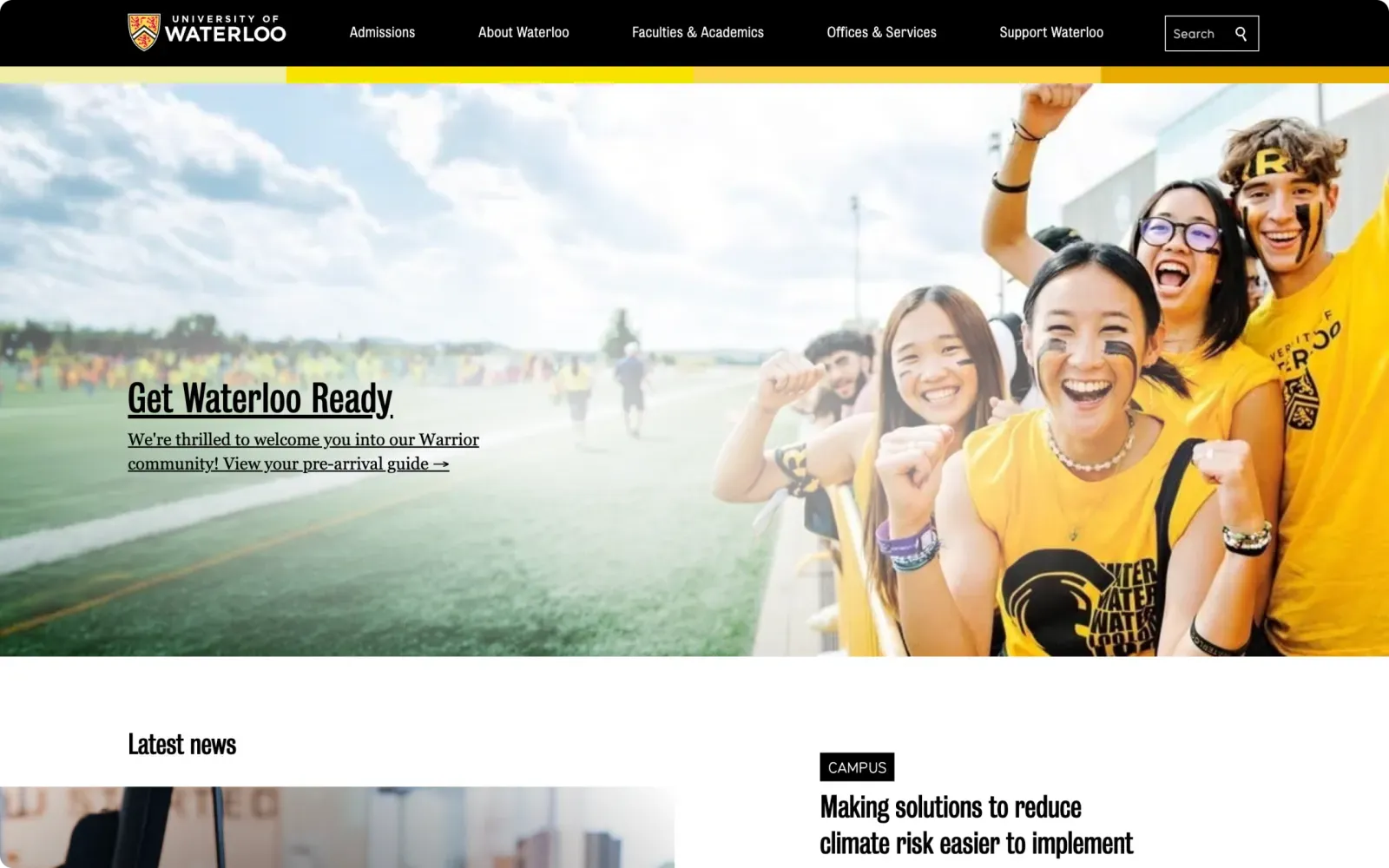
That's how we approached the redesign for the University of Waterloo's Centre for Education in Mathematics and Computing. Accessibility testing ran throughout the project, and the site, which serves more than 300,000 students in over 85 countries, launched fully compliant.
For public organizations, state and local governments in the US, including public colleges and universities, must meet WCAG 2.1 AA by April 2027, and accessibility legislation in Canada continues to expand province by province.
If you're unsure where your site stands, an audit through our web accessibility services establishes a baseline while there's still time to plan rather than scramble.
Responsive design
Responsive web design is an approach where a single site adapts its layout to any screen, from a phone held in one hand to a widescreen monitor. With phones now driving more web traffic than desktops, and Google indexing the mobile version of a site first, the phone experience is the primary experience. In practice that means text that's readable without zooming, buttons big enough to tap, and pages that never need sideways scrolling.
Performance
Performance is how quickly a website loads and how smoothly it responds once it has. A surprising amount of it is settled during design, in choices about image sizes, fonts, animations, and how much each page tries to do.
Google measures the result through Core Web Vitals, three metrics covering loading speed, responsiveness, and visual stability, and factors them into search rankings. A slow site loses visitors and visibility at the same time, which makes performance a marketing concern as much as an engineering one.
Web Design vs. Web Development: What's the Difference?
Web design determines what a website should do and how it should feel to use. Web development is the engineering that turns those decisions into a working product.
A designer produces sitemaps, wireframes, prototypes, and visual designs; a developer turns them into code, configures the content management system (CMS), and makes everything function.
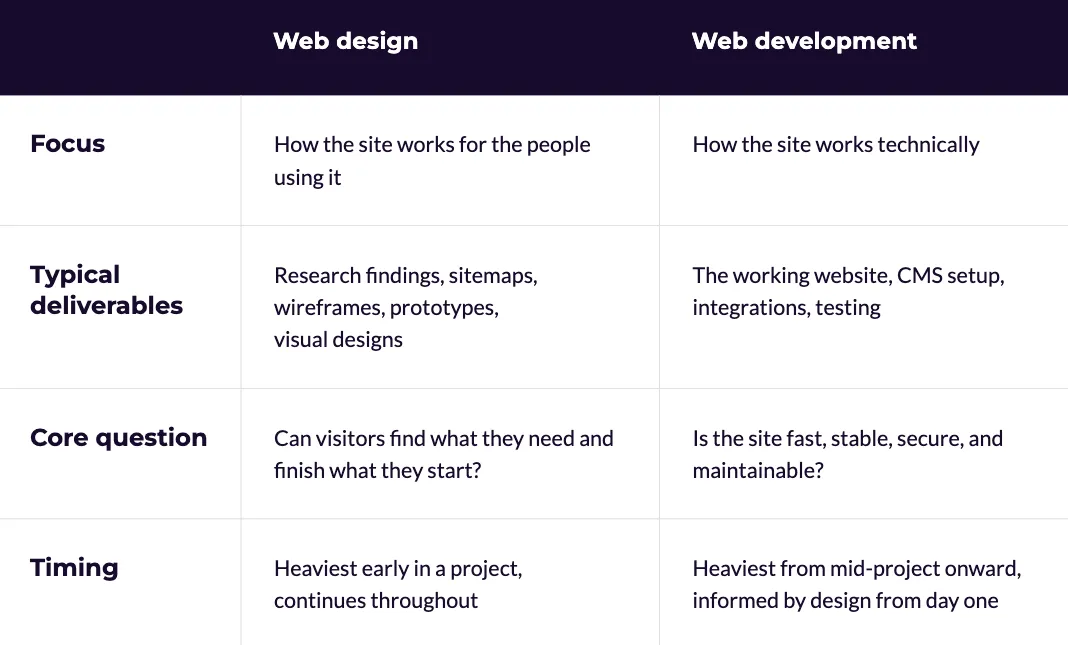
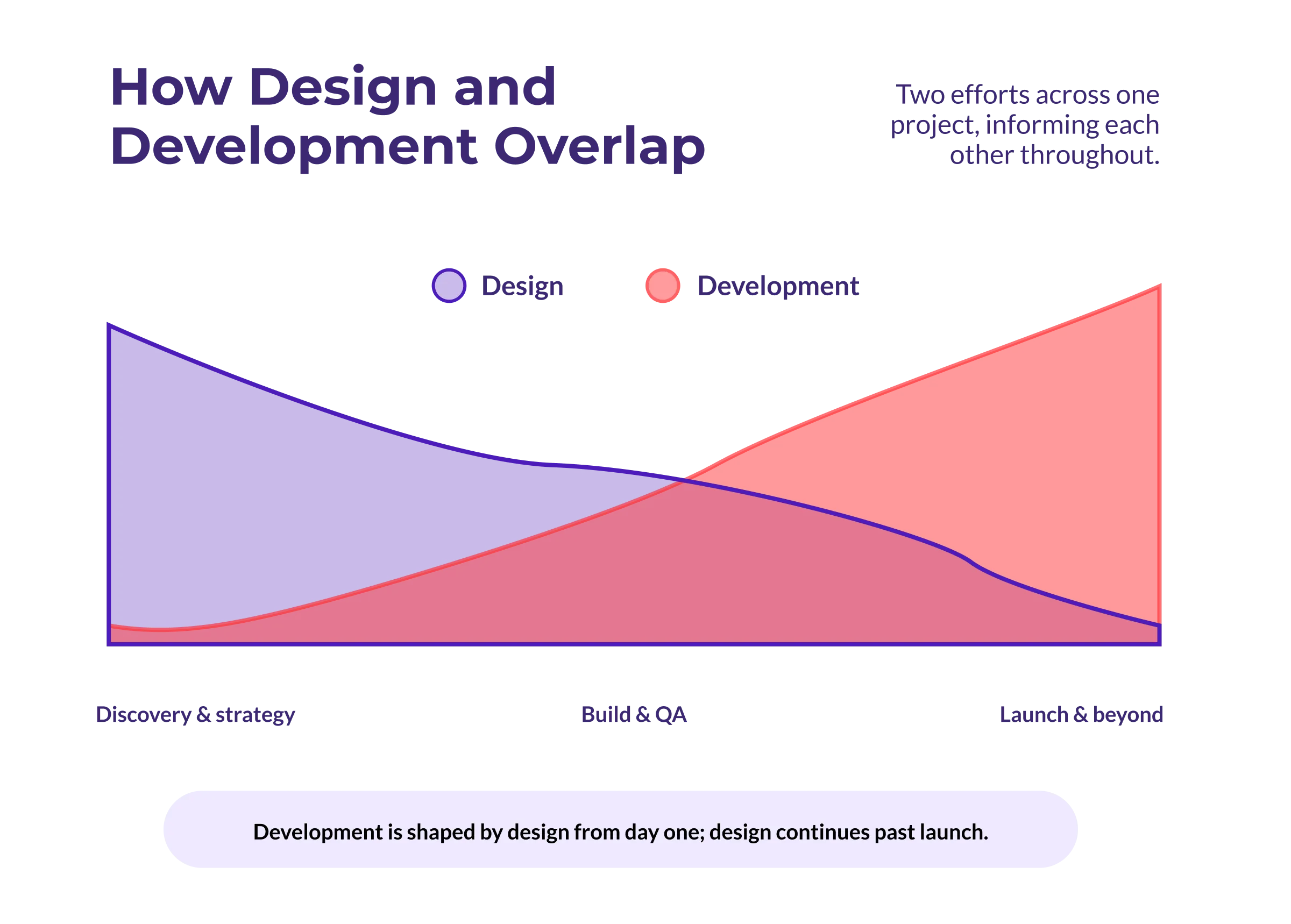
In practice the line blurs, and it should. A filterable program directory is a design idea with engineering consequences, and technical constraints shape what a designer can propose.
It's one argument for having design and development under one roof, where the two inform each other instead of meeting at a handoff.
Design leads early and development ramps up later, but the two run together for most of a project rather than meeting at a single handoff.
Why Is Web Design Important?
Your website is where people form their judgment of your organization, and design is what they're judging. Visitors decide within moments whether a site feels credible, and they decide before reading much of anything.
Design also stands between you and every outcome the site exists to produce. Enrolment inquiries, donations, lead forms, and service requests are all tasks, and the design either clears the path to them or clutters it. When conversions sag despite steady traffic, the cause usually lives somewhere in the experience.
Design shapes who finds you in the first place, too. Structure, performance, and accessibility feed search rankings, and AI search tools answer questions by extracting from clearly organized pages. A well-designed site is easier to find and easier to cite, for humans and machines alike.
What Makes a Website Well Designed?
A well-designed website lets visitors accomplish what they came to do without friction, confusion, or workarounds. Appearance contributes, but the test is behavioural. Lists of web design best practices run long; these six qualities are what they add up to:
- Clear purpose: every page answers a question or enables a task, and it's obvious which one.
- Findable content: navigation and search reflect how users think, so nothing important hides more than a few clicks deep.
- Accessible to everyone: the site works with keyboards, screen readers, and captions, and meets WCAG standards.
- Fast anywhere: pages load quickly on a mid-range phone over cellular data, not only on office wifi.
- Consistent throughout: the same patterns, components, and voice across every section, whoever published them.
- Adaptable to any device: the experience holds up on a phone in a lineup as well as on a desktop at work.
A site can win awards and still fail this list, because the measure of good web design is whether users complete tasks and achieve their goals.
What Does the Web Design Process Look Like?
A typical website design process moves through five stages, and the order is important, because each stage answers questions the next one depends on.
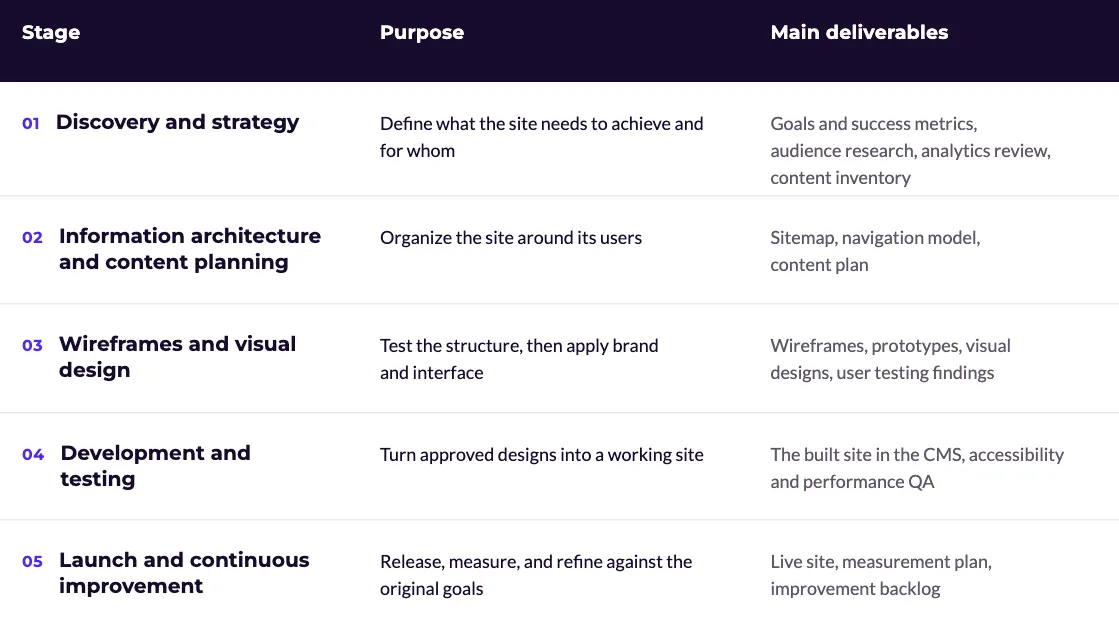
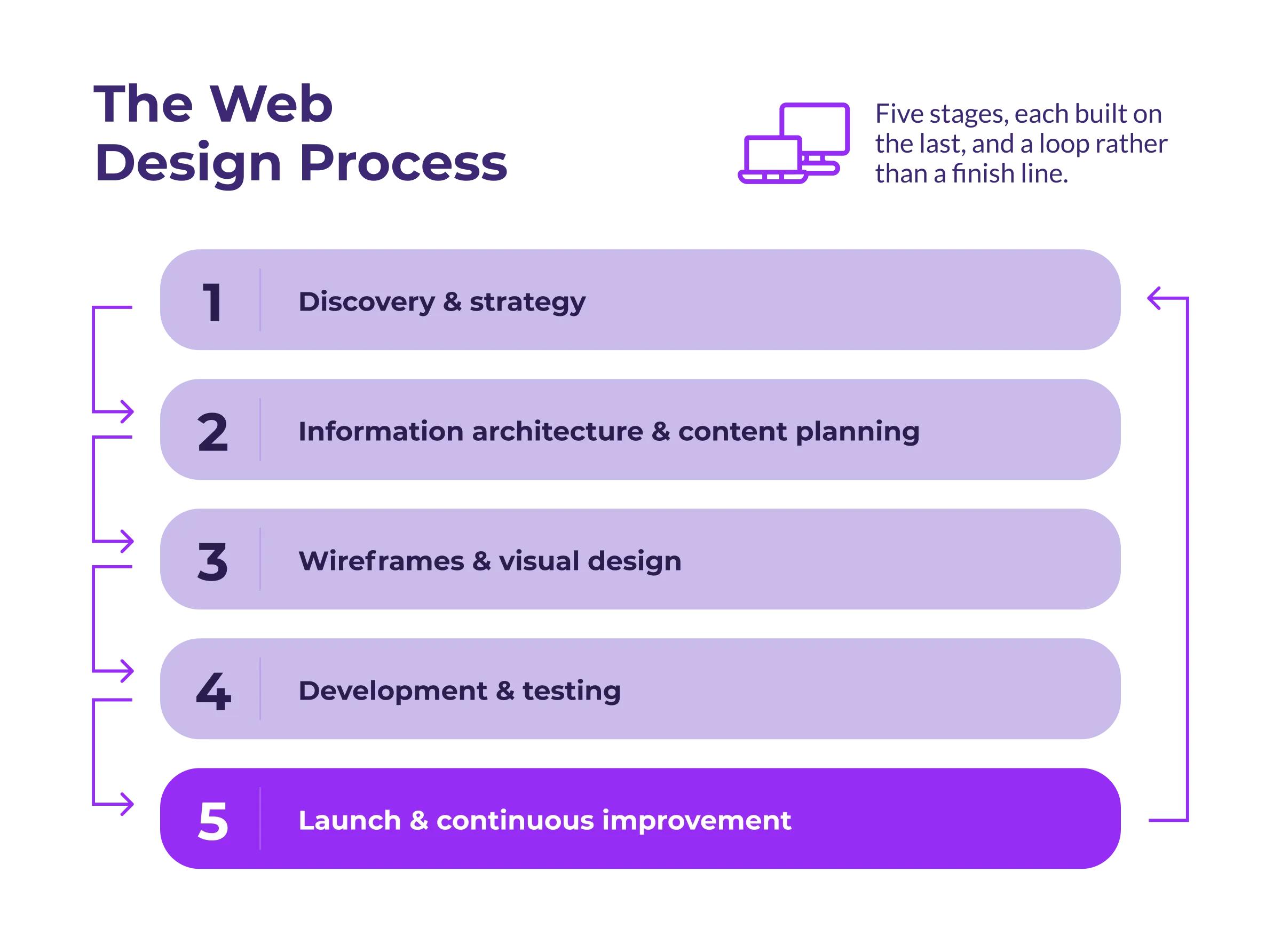
Each stage answers questions the next one depends on, and launch feeds straight back into discovery rather than ending the work.
Discovery and strategy
Discovery defines what the website needs to achieve and for whom. It draws on analytics, stakeholder interviews, user research, and an honest inventory of existing content. Projects that skip it tend to produce reskins, new paint over old problems.
Information architecture and content planning
Structure comes next, with a sitemap and navigation model built from what discovery revealed about users. Content is planned before layout so pages get designed around what they need to say rather than filled in afterwards.
Wireframes and visual design
Wireframes test the structure while it's still cheap to change. Once the skeleton holds up, visual design adds brand, hierarchy, and the interface itself, with user testing along the way rather than one big reveal at the end.
Development and testing
Development turns approved designs into a working site, built in the CMS your team will use every day. Quality assurance covers accessibility, performance, browsers, and devices, so problems surface before launch rather than in a visitor's session.
Launch and continuous improvement
Launch is an important milestone, not a finish line. Websites that keep performing are treated as products, measured against the goals set in discovery and refined as the data comes in.
Web Design for Complex, Multi-Audience Websites
General web design advice tends to assume one site, one audience, and a handful of pages. Enterprise, higher education, government, healthcare, and nonprofit websites rarely fit that picture. They serve distinct audiences with competing needs across thousands of pages, and the people publishing to them each week aren't designers.
At that scale, consistency can't depend on individual effort, which is why enterprise web design leans on design systems. A shared library of components and standards lets a department build a new page that looks and behaves like the rest of the site without routing everything through one central team. Governance carries the other half of the load; the habits that keep enterprise website projects on track begin with user research and clear ownership rules, long before anyone opens a design tool.
The platform belongs in this conversation as well. A CMS either supports structured content and a design system or works against both, and the difference shows up every day the site is edited.
How Do You Know When Your Website Needs a Redesign?
A website needs a redesign when it keeps blocking users or your own team from getting things done, and the causes sit deeper than content updates can reach. The signs show up in data and in daily frustration:
- Conversions or search traffic sliding across quarters despite fresh content
- Visitors abandoning core tasks, like applications or forms, partway through
- New content getting bolted on wherever there's room because the structure no longer fits
- Accessibility failures while legal deadlines close in
- A brand or strategy the site no longer reflects
- Editors working around the CMS instead of with it
Not everything here demands a rebuild, and some of it yields to steady, incremental fixes. What matters is accumulation. One symptom is a project; several at once point to the foundation. In higher education, the signs it's time to rebuild surface first in program pages and enrolment paths, and the same pattern appears in government service directories and nonprofit donation flows.
Website Design FAQs
How does web design affect user experience?
Every design decision changes the distance between a visitor and their goal. Navigation, page structure, loading speed, and form length each add or remove effort, and the sum of those choices is the website user experience.
Is web design the same as UX design?
No. UX design is one discipline inside web design, focused on how people move through a site and complete tasks. Web design also takes in the interface, the visual identity, accessibility, content structure, and performance.
What's the difference between web design and graphic design?
Graphic design communicates through fixed visuals, where the designer controls exactly what the viewer sees. Web design produces something interactive that has to adapt to different screens, input methods, and assistive technologies, so it deals in behaviour as much as appearance.
How long does a website redesign take?
For an organization with a large or complex site, somewhere between four months and a year is a reasonable range. Where a project lands depends on the site's size, how much content needs rework, how many stakeholders sign off, and whether the platform changes along with the design.
Does the CMS affect web design?
Considerably. The CMS decides whether the design system survives daily publishing, whether editors can build on-brand pages without a developer, and whether one design can stretch across dozens of sites. Flexible content modelling is one reason universities so often choose Drupal for large, multi-audience websites.
Plan Your Next Web Design Project
We've been designing and building websites for more than two decades, mainly for organizations whose sites can't afford to be simple, from universities and government agencies to nonprofits and enterprise teams. If a redesign is on the horizon, or you'd like a clearer picture of where your current site stands, our web design services page outlines how we approach discovery, UX, accessibility, and development.
And if you'd rather talk it through first, get in touch.